Notifications
Told When It Matters, Not When Somebody Says Hello
Role changes, granted permissions, approved join requests and urgent announcements – with a full history you can filter.
Free to start · No sales call · Basketball · Football · Volleyball
What it is
Notifications
RosterUp tells people when something actually changes. A role update, a granted permission, an approved join request, an urgent announcement or a direct mention arrives as a notification with a type and a timestamp, and every notification is kept in a searchable history you can filter by read and unread.
Team tools either notify too much or too little. A chat group notifies on every message, so people mute it and then miss the one that mattered. A spreadsheet notifies on nothing, so changes are discovered by accident days later.
RosterUp notifies on state changes – the things that alter what somebody can do or needs to do. Your role changed. You were granted a permission. Your request to join was approved. Somebody is asking you for permission. An urgent announcement was posted, or you were mentioned in one. These are events with consequences, and they are not the same as conversation.
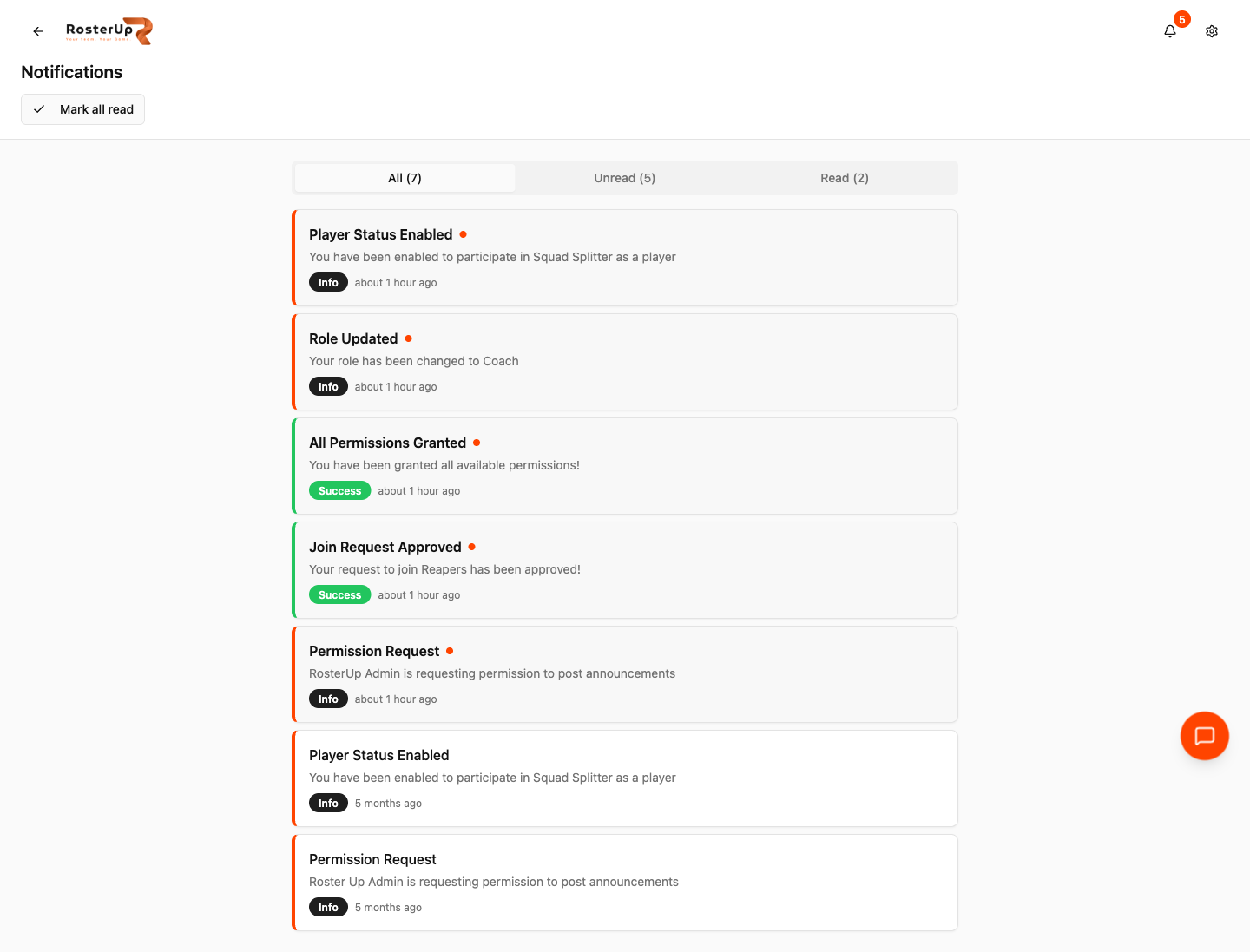
Role changes, permissions and join requests – kept, filtered, and easy to work through. — ## Gaps to re-capture later – The header notification bell with its unread badge, as a crop. – The notification dropdown opened from the bell. – An Alert-type notification from an urgent announcement or a mention. The captured set contains only Info and Success. – The Chat tab unread badge alongside the notification bell, to show the two counts are separate. – Mobile notification history.
How it works
From setup to match day, step by step.
01
A bell icon in the app header carries a count of unread notifications, visible from every screen. Opening it shows the recent ones; Notification History at
/notifications shows everything. 02
The history page has a Mark all read control and three tabs with live counts – All, Unread and Read – so you can work through a backlog and then look back at what you have already handled.
03
Each notification shows a title, a description written in plain language, a type badge and a relative timestamp. Three types are used: Info for neutral state changes, Success for things that went your way, and Alert for things that need attention, which is what urgent announcements and direct mentions produce.
04
Typical entries read exactly as you would expect: “Role Updated – Your role has been changed to Coach”, “All Permissions Granted – You have been granted all available permissions!”, “Join Request Approved – Your request to join Reapers has been approved!”, “Permission Request – RosterUp Admin is requesting permission to post announcements”.
What you get
Everything in Notifications.
Unread badge everywhere
The header bell carries the unread count on every screen.
Full history
Nothing is lost when you dismiss it. The history keeps everything.
Read and unread filters
Three tabs with counts, plus Mark all read.
Three notification types
Info, Success and Alert, so the important ones look different.
Team and permission events
Role changes, granted and revoked permissions, approved join requests, and incoming permission requests for coaches.
Announcement escalation
An announcement marked Urgent, or one that mentions you directly, arrives as an Alert rather than as ordinary information.
Chat unread counts
Separate from notifications, the Chat tab in the mobile navigation carries its own unread message badge, capped at 99+, so conversation does not drown out state changes.
Plain language
Notifications describe what happened and what it means, not a system event code.
Who it helps
Both sides of the team sheet.
For coaches and managers
You find out when a player asks for something rather than discovering the request a week later. When you grant a permission, the player is told, so you do not have to tell them separately. And because permission and role events are notifications rather than chat messages, the record of who was given what survives.
For players
You know when your join request is approved, when your role changes and when you have been given the right to do something new. You are not notified for every message in every team – conversation stays in chat with its own badge.
Wherever you are
Built for the sideline, shared with a link.
On the phone
The notification bell sits in the header of every screen with its unread count. The history page is a full-width stacked list with the three filter tabs across the top, each notification a card with its type badge and timestamp. Because RosterUp can be installed to the home screen as an app, notifications reach players the way an app’s notifications do rather than as an email nobody opens.
Sharing and public access
Notifications are personal and private. There is no public view.
In practice
How real teams use it.
A player is told immediately that their request to join a club has been approved, and can open the team the same minute.
A coach sees that a player has requested the right to post announcements, and grants it from the Permissions page.
A captain is notified that they have been given Create Events, and knows they can now schedule training.
A squad receives an urgent venue change as an Alert rather than as one more line in a chat thread.
A player scrolls Notification History to check when their role was changed.
Why not just a group chat and a spreadsheet?
In a chat group, every message is the same weight, so everything is either noise or missed. Email notifications from team tools are routinely ignored. Neither gives you a history you can filter, and neither distinguishes “somebody said hello” from “you are now allowed to manage the roster”.
RosterUp reserves notifications for state changes and keeps them all.
Questions
Frequently asked.
What does RosterUp notify me about?
State changes: role updates, granted or revoked permissions, approved join requests, incoming permission requests, and urgent announcements or announcements that mention you.
Do I get notified for every chat message?
No. Chat has a separate unread badge on the Chat tab so conversation does not drown out the notifications that need action.
Are notifications kept?
Yes. Notification History holds everything, with All, Unread and Read tabs and a Mark all read control.
What are the notification types?
Info for neutral state changes, Success for things that went your way, and Alert for things needing attention.
What makes something an Alert?
Announcements marked Urgent, and announcements that mention you directly.
Can I mark everything as read?
Yes, with the Mark all read control on the history page.
Will I be told when a coach grants me a permission?
Yes. Granting or revoking a permission notifies the player.
Does the coach get told when a player asks for something?
Yes. Permission requests appear as notifications and on the coach’s Permission Management panel.
Next
Works with the rest of RosterUp.
Announcements
Pinned, prioritised messages that sit at the top of your team page until they stop mattering.
Read more
Team Management
One team profile that holds your players, your staff and exactly who is allowed to do what.
Read more
Schedule and RSVP
Create trainings, games and meetings in seconds. Players answer with one tap and you see a number.
Read more
Get started
Told When It Matters, Not When Somebody Says Hello
Free to start. No sales call. Create your team and bring the squad in today.