Live Game
A Real Scoreboard in Your Pocket
Score, game clock, shot clock and fouls for basketball, football and volleyball. Share a QR code and the whole sideline follows live.
Free to start · No sales call · Basketball · Football · Volleyball
What it is
Live Game
Live Game turns a phone or a laptop into a full scoreboard for your match – score, period, game clock, shot clock and team fouls, adapted to basketball, football or volleyball. One tap produces a QR code and a public link, and anyone who scans it watches the score update live in a read-only spectator view.
Amateur and youth sport is played on courts and pitches that have no scoreboard, or one that nobody can find the key for. Somebody ends up keeping score on paper, the bench argues about the period, and parents standing on the sideline have no idea what is happening. Meanwhile the people who could not come have no way to follow at all.
Live Game replaces all of that with a screen you already have. It is a real scoreboard: it understands that basketball has quarters, a 24-second shot clock and a bonus at five team fouls, that football has halves, extra time and penalties, and that volleyball has sets with no clock at all. And because it is built on a live connection, the same score is instantly visible to everyone you have shared the link with.
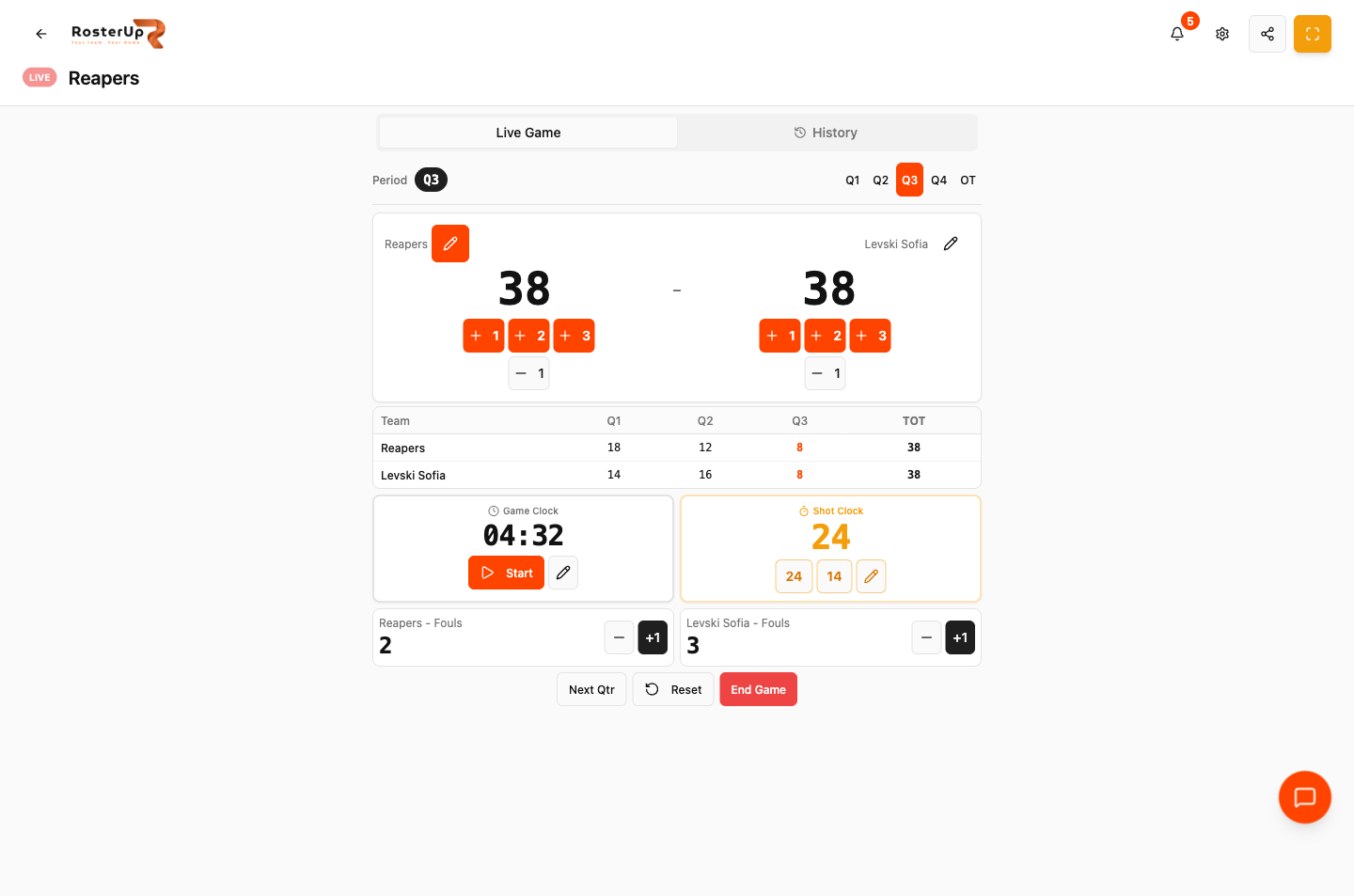
Score, clock, shot clock, fouls and a live box score – on the device you already have.
How it works
From setup to match day, step by step.
01
A coach opens Live Game from the dashboard or the team page. A LIVE badge appears in the header and a game session starts.
02
The board is laid out the way a scoreboard is. A Period control sits at the top with the periods for your sport. Under it, the two teams with their scores in large type, each with its own scoring buttons and a minus button for corrections. Team names default to Team A and Team B and can be renamed to the real fixture in two taps.
03
Beneath the scores is a box score table – one row per team, one column per period, plus a total. The period in progress is highlighted, so the bench can see the run in the current quarter rather than only the aggregate.
04
The timing row holds the Game Clock with a Start control and an edit dialog for setting minutes and seconds directly, and for basketball a Shot Clock with one-tap 24 and 14 resets. Below that, team fouls with plus and minus controls and a bonus indicator.
05
At the bottom sit the three game actions: advance the period (Next Qtr, Next Half or End Set depending on the sport), Reset, and End Game, which saves the result to the team’s game history.
06
The share control in the header opens Share Live Game: a QR code, the public link, and the line “Spectators will see a read-only view with live score updates”. Parents scan the code once from the sideline and follow the whole match on their own phone.
What you get
Everything in Live Game.
Sport-aware scoring
Basketball gets +1, +2 and +3 buttons, a 24-second shot clock and a five-foul bonus. Football gets a single +1 Goal button, no shot clock, two halves plus Extra Time and Penalties. Volleyball gets +1 Point, no clock at all, five sets, and tracks sets won towards best-of-five.
Volleyball serve tracking
The board shows which team is serving and switches the serve to the scoring team automatically, with match-point indication and a set-winner celebration.
Period-by-period box score
Not just the total. Every period is recorded and totalled, with the live period highlighted.
Game clock and shot clock
Start and stop the game clock, or set it precisely with the edit dialog. Reset the shot clock to 24 or 14 with a single tap.
Team fouls with bonus
Foul counts per team with a bonus indicator once the threshold is reached.
Rename teams
Set the real fixture names so the shared scoreboard and the saved history read correctly.
QR code sharing
Generate a QR code and a public spectator link in one action.
Spectator mode
The public view shows the live score, period, clocks, full box score and fouls, labelled “Spectator Mode – Read-Only View”. Spectators cannot change anything.
Fullscreen mode
Put the board on a laptop or a TV and run it as a real scoreboard for the hall.
Audible signals
The board produces a beep for clock events.
Game history
Completed games are saved to the team’s history tab with their final score.
Permission-controlled
Running the board requires the Manage Live Game permission, so a coach can hand scorekeeping to a team manager or a parent without giving them anything else.
A closer look
Screen by screen.
Captured from the live RosterUp app.
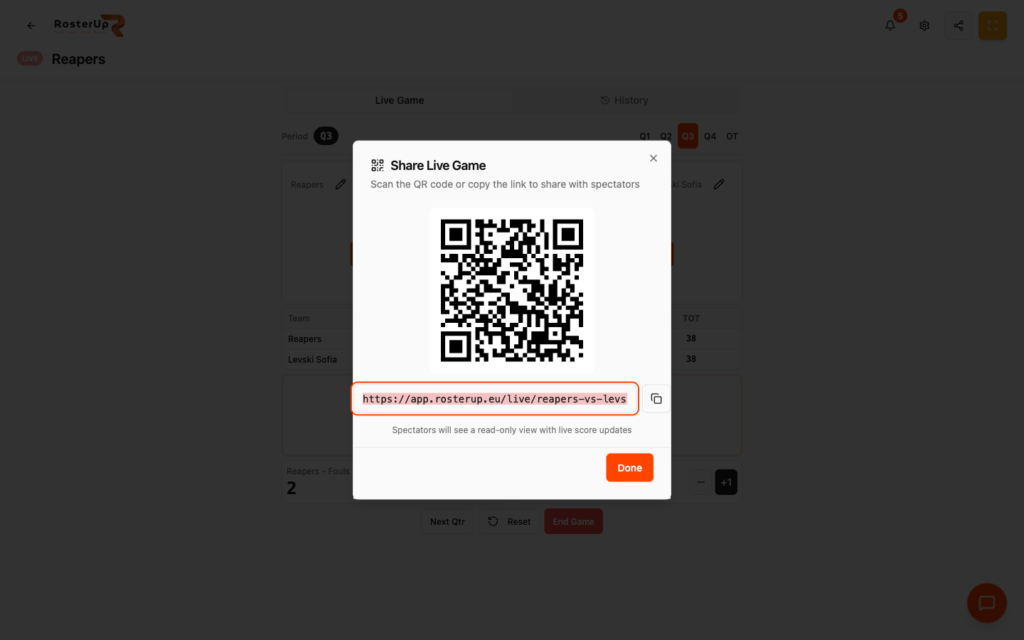
One QR code and the whole sideline is watching.
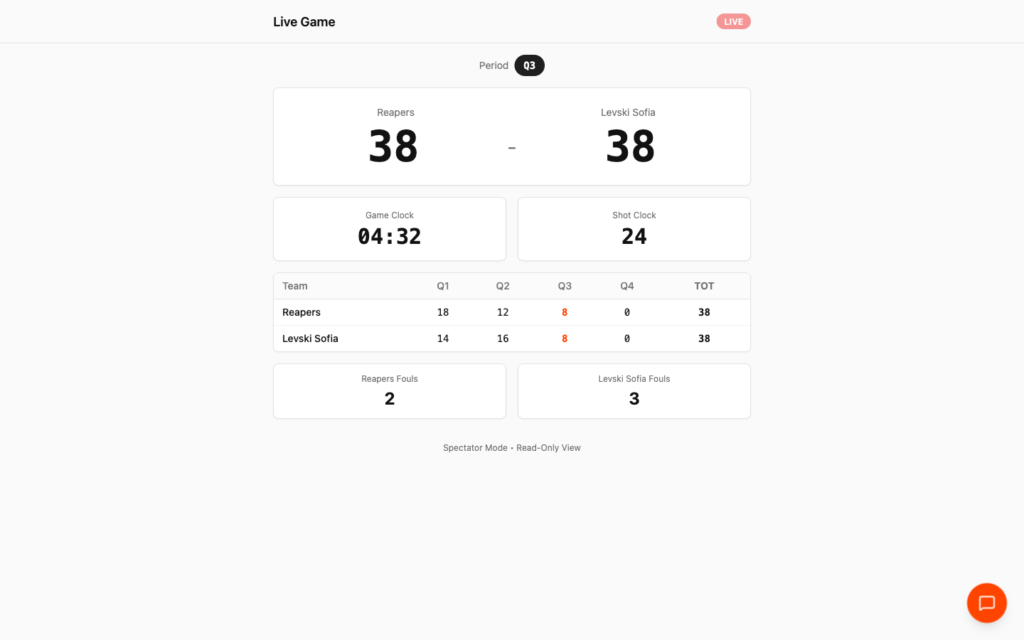
What everyone else sees. Nothing they can touch.
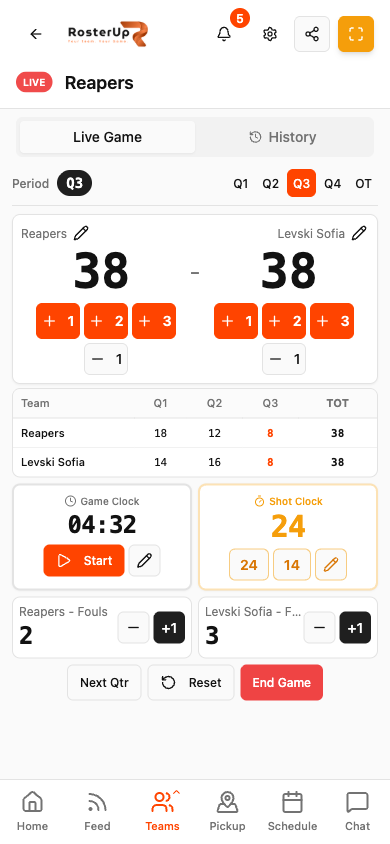
Run the whole board one-handed from the bench.
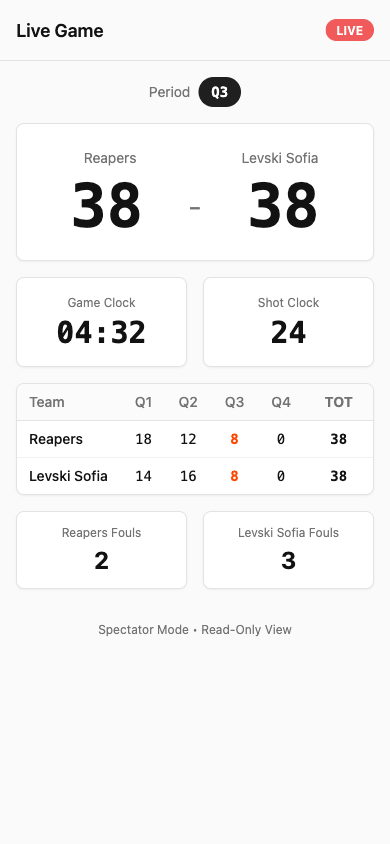
Scan once, follow the whole game. — ## Gaps to re-capture later – Football and volleyball boards. The audit only scored a basketball game, so the football halves / Extra Time / Penalties layout and the volleyball sets / serve indicator / match point layout are documented from the product’s sport configuration but NOT captured. These are needed before publishing the “a board that knows your sport” section. – Fullscreen mode. – The bonus indicator active at five team fouls. – The Game History tab with completed games. – The Edit Game Clock and Edit Shot Clock dialogs.
Who it helps
Both sides of the team sheet.
For coaches and managers
You get a scoreboard wherever you play, without booking equipment. You can hand the board to a parent or a substitute for the match, because the permission is granular and everything is one tap. And the box score is a coaching record – “we lost the third quarter 8-16” is a conversation you can only have if somebody wrote it down.
Wherever you are
Built for the sideline, shared with a link.
On the phone
Live Game is designed for a phone held in one hand on a bench. The scoring buttons are large, colour-filled and placed under each team’s score, so scoring is a single confident tap. The period selector runs across the top, the box score is a compact table, and the clocks sit in two side-by-side cards. The spectator view is equally phone-first: big numbers, no controls, readable at arm’s length.
Sharing and public access
Pressing share generates a public URL of the form
app.rosterup.eu/live/your-fixture-slug, together with a QR code for that link. Anyone with the link can open the spectator view without a RosterUp account. The view updates live as the coach scores. It exposes only what a scoreboard exposes – team names, scores, period, clocks and fouls. In practice
How real teams use it.
A basketball coach runs the board from the bench and prints the QR code on the team’s match-day post so parents can follow.
A youth football manager scores a 9v9 fixture on a pitch with no scoreboard, using the halves plus Extra Time layout.
A volleyball coach tracks a best-of-five with serve indication and set wins, without a clock on screen.
A club puts the fullscreen board on a TV in the hall so spectators at the far end can read it.
A coach reviews the saved box score afterwards and sees the team lost the game in one quarter.
Why not just a group chat and a spreadsheet?
A paper scoresheet cannot be shared while the game is running and is usually lost by Monday. A generic scoreboard app knows one sport, has no connection to your team, and cannot be handed to a parent with limited rights. Posting the score into a chat group means typing it repeatedly and still leaves the people who did not come guessing.
Live Game is tied to your team: it knows your sport, it saves into your team’s history, and it produces a link anyone can watch.
Questions
Frequently asked.
Which sports does the scoreboard support?
Basketball, football and volleyball. The board changes to match: basketball gets +1/+2/+3, a 24-second shot clock and a five-foul bonus; football gets a single goal button plus Extra Time and Penalties; volleyball gets point scoring, five sets and no game clock.
Can people watch the score without a RosterUp account?
Yes. The share control produces a public link and a QR code. Anyone who opens it sees a read-only spectator view that updates live.
Can a spectator change the score?
No. The spectator view is explicitly read-only and is labelled “Spectator Mode – Read-Only View”.
Does it have a shot clock?
Yes, for basketball, with one-tap 24 and 14 resets and a manual edit.
Can I correct a mistake?
Yes. Each team has a minus button for scores and fouls, and the game clock can be set directly to any minutes and seconds.
Does it track fouls and the bonus?
Yes. Team fouls are counted with plus and minus controls, and a bonus indicator appears once the threshold is reached.
Does volleyball scoring work properly?
Yes. The board tracks sets towards best-of-five, shows which team is serving, moves the serve to the scoring team, and indicates match point.
Can somebody else run the board?
Yes. Running Live Game requires the Manage Live Game permission, which you can grant to a player, a team manager or a parent without giving them any other rights.
Can I display it on a big screen?
Yes. Fullscreen mode turns a laptop or TV into a hall scoreboard.
Is the result saved afterwards?
Yes. Ending a game saves it to the team’s game history with its final score.
Next
Works with the rest of RosterUp.
Game Plan
Build the whole game on one screen and get every player’s minutes calculated for you.
Read more
Public Sharing
Plans, plays, splits and live scores all open from a link, read-only, with no account.
Read more
Team Management
One team profile that holds your players, your staff and exactly who is allowed to do what.
Read more
Get started
A Real Scoreboard in Your Pocket
Free to start. No sales call. Create your team and bring the squad in today.