Public Sharing
Everyone Gets the Link. Not Everyone Needs an Account.
Game plans, squad splits, plays, live scores and pickup games all open from a link, read-only, on any phone.
Free to start · No sales call · Basketball · Football · Volleyball
What it is
Public Sharing
Everything a coach builds in RosterUp can be handed to people who do not use RosterUp. Game plans, squad splits, tactical plays, live scoreboards and pickup games all have public links that open without an account. Parents, assistant coaches, spectators and guest players get exactly what they need, read-only, on their own phone.
Team software usually assumes that everyone who matters has an account. In amateur sport that assumption is wrong. The assistant coach who makes the substitutions is not going to sign up. The parents on the sideline want the score, not an onboarding flow. The friend somebody brought to a pickup game is not going to create a profile in a car park.
RosterUp treats this as a design constraint rather than an edge case. The people who need to use the product have accounts. The people who need to see the output get a link. Sharing is built into every tool that produces something worth sharing, and the public view is always read-only, so nothing a coach spent an evening building can be broken by somebody opening it.
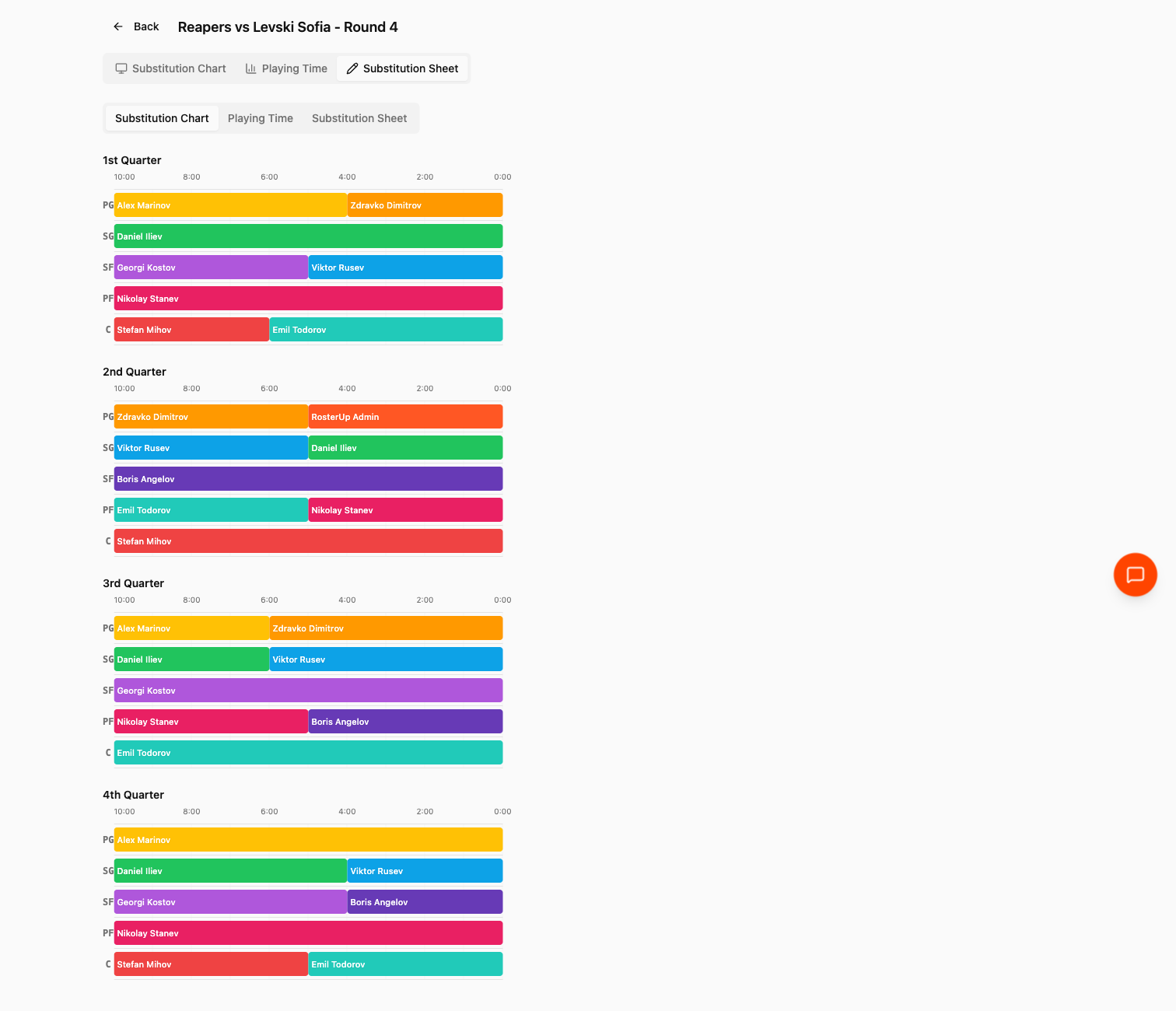
The assistant coach gets the plan. Not an invitation to sign up.
How it works
From setup to match day, step by step.
01
Each shareable tool has its own share control, and each produces a clean URL:
02
– Game Plan – the Share button in the rotation editor copies a link such as
app.rosterup.eu/game/reapers-abc123. It opens the full plan with all three views: the rotation chart, the playing-time chart and the substitution sheet. – Squad Splitter – the Share dialog offers Copy Link, producing app.rosterup.eu/squad/your-split-slug, and Share to Chat, which posts the split into the team conversation instead. – Exercises – every saved play has a link such as app.rosterup.eu/exercise/your-play-slug, which opens the animated play with its Play, Reset, Next and phase controls and the coach’s written description. – Live Game – the share control produces both a link (app.rosterup.eu/live/your-fixture-slug) and a QR code, so a coach can show a phone screen to the sideline rather than typing a URL into a chat. – Pickup Games – each game has a public page at app.rosterup.eu/pickup/your-game-slug with a descriptive page title. Unlike the others, this one is interactive: people can join from it, including guests without an account. 03
Everything except the pickup page is strictly read-only. There is no editing control, no way to change somebody else’s plan, and no requirement to sign in.
What you get
Everything in Public Sharing.
Five public surfaces
Game plans, squad splits, tactical plays, live scoreboards and pickup games.
No account required
Every public link opens for anyone.
Read-only by design
Shared plans, splits, plays and scoreboards cannot be edited from the public view.
QR code for live games
The one case where typing a URL is impractical – a sideline full of parents – gets a scannable code.
Guest participation on pickup pages
The pickup page is the exception that proves the rule: it is public and actionable, because the whole point of a pickup game is letting people you do not know join it.
Share to Chat
Where the audience is your own team rather than the outside world, the split can go straight into the team conversation.
Descriptive page titles
Public pickup pages carry the game name in the browser title, so a link pasted into a chat app previews correctly.
Live updates
The spectator scoreboard is not a snapshot. It updates as the coach scores.
Mobile-first public pages
Every public view is designed for a phone, because a shared link is opened on a phone almost every time.
A closer look
Screen by screen.
Captured from the live RosterUp app.
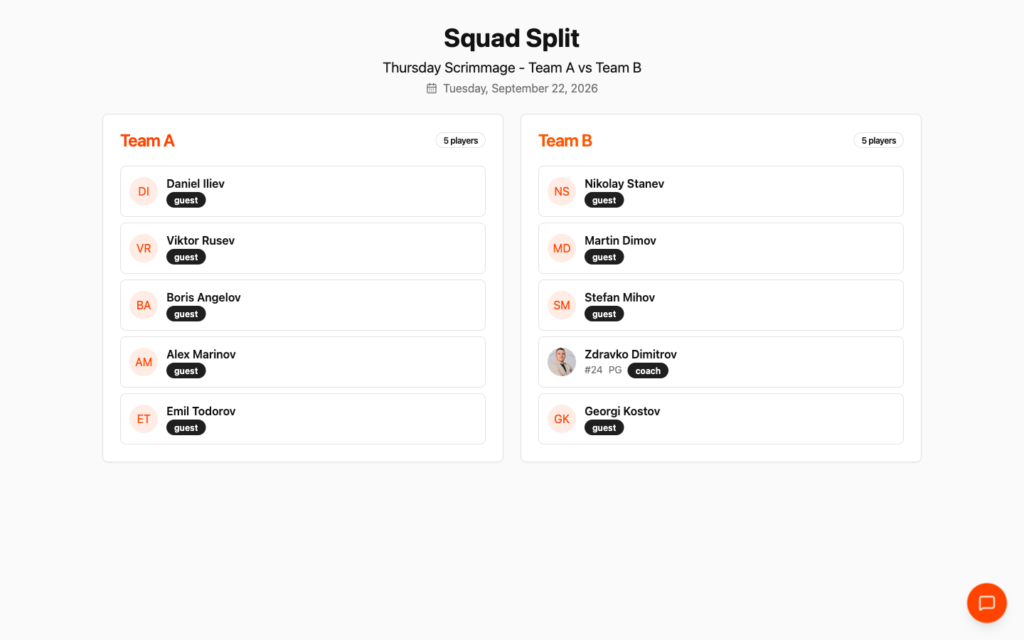
Two teams, one link, nobody asking who they are with.
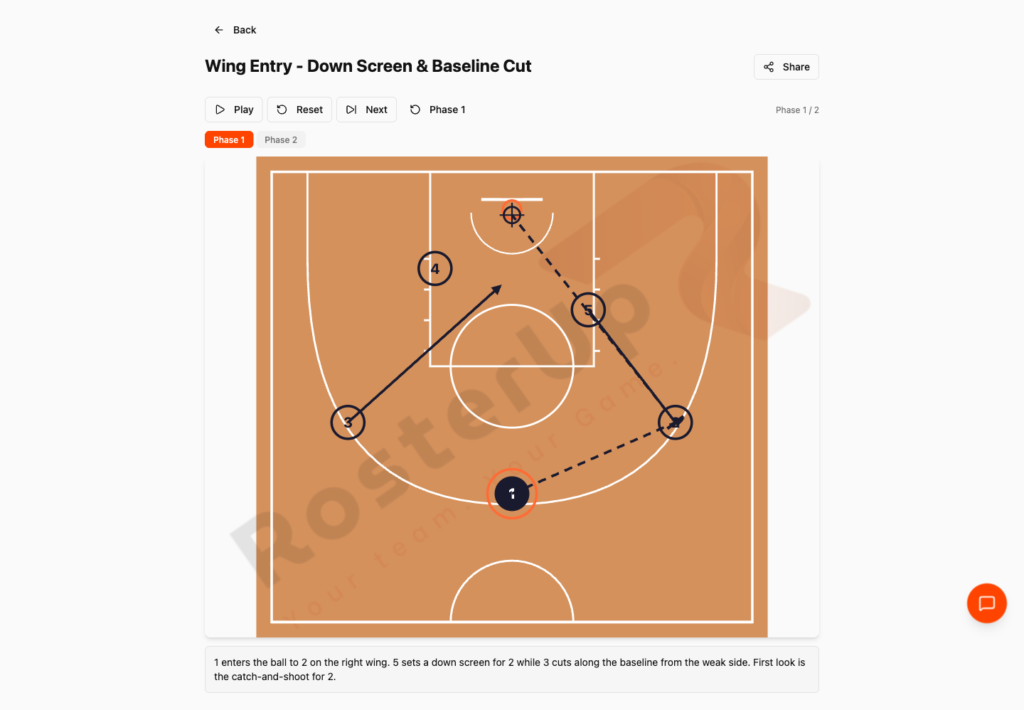
Replay it until it makes sense.
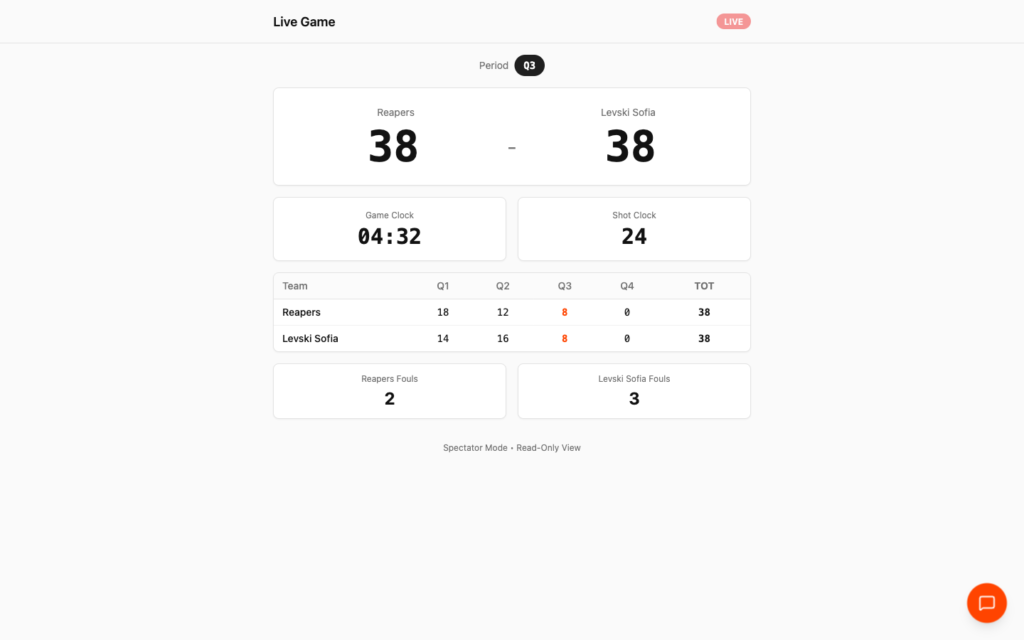
Live, read-only, and nothing anyone can knock over.
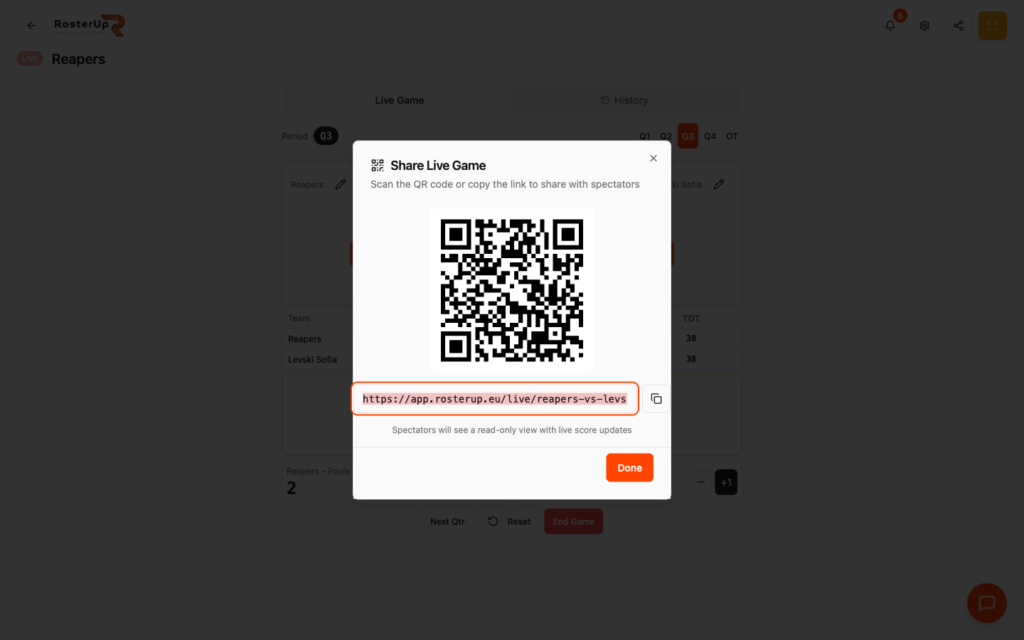
Show your phone to the sideline. Done.
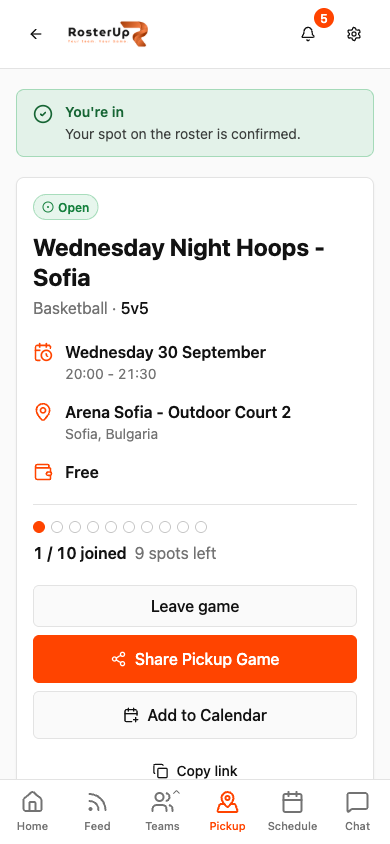
The one public page that is also a join button.
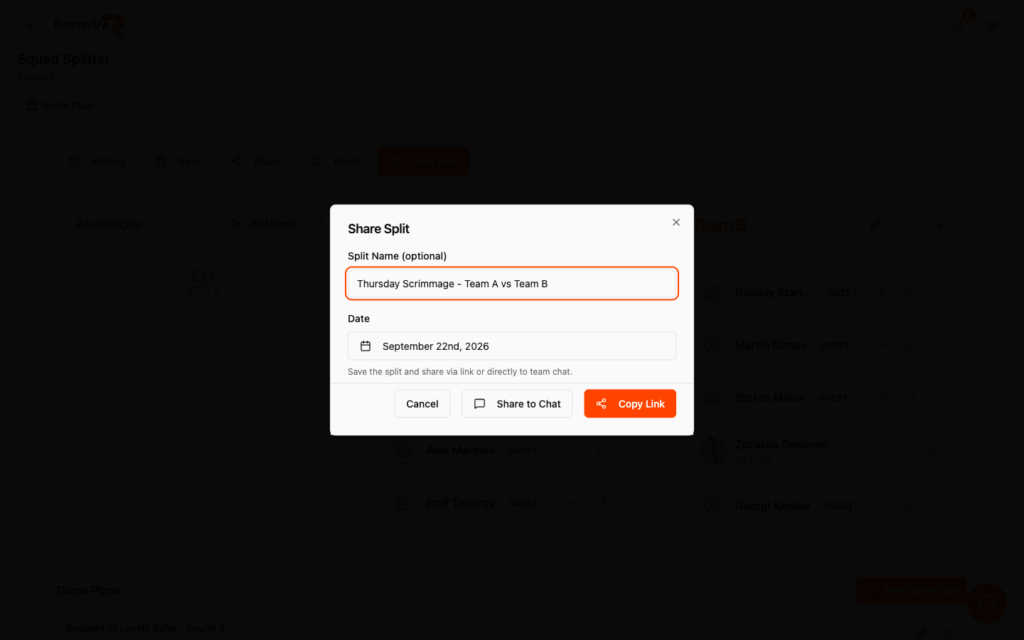
Inside the team, or outside it.
Who it helps
Both sides of the team sheet.
For coaches and managers
You can involve people without recruiting them. The assistant who runs substitutions gets the sheet. The parents get the score. A player who has not installed anything yet can still read the play. That removes the single biggest obstacle to adopting a team tool, which is that half the people around a team will never sign up for anything.
It also means your work survives the group chat. A link to a plan is still a plan in three weeks; a photo of a whiteboard pasted into a thread is gone.
Wherever you are
Built for the sideline, shared with a link.
On the phone
Public pages are the most likely part of RosterUp to be opened on a phone, and they are built accordingly. The shared game plan scrolls its timeline horizontally with the position labels fixed at the left. The spectator scoreboard renders scores in very large type, readable at arm’s length in a noisy hall. The shared play fills the screen with its animation controls in a single row. The public squad split shows two clean team panels.
Sharing and public access
This feature is the public access layer. What is worth stating explicitly on the website is what is not shared: team chat is private, announcements are private, the roster is private, and the team schedule is visible to members rather than to the open web. RosterUp shares outputs – a plan, a split, a play, a score, a game – not the team’s internal conversation.
In practice
How real teams use it.
A coach sends the substitution sheet link to the assistant who will actually make the changes on match day.
A club puts the live game QR code into its match-day post so anyone who cannot travel can follow the score.
A parent scans the QR code on the sideline and follows the game on their own phone.
A coach shares a set play before Thursday so the squad arrives already knowing it.
A pickup organiser shares one link in a group chat and people join the page, including friends who do not use RosterUp.
An assistant reads the squad split on the way to the hall, posted straight into team chat.
Why not just a group chat and a spreadsheet?
Screenshots are the usual answer, and they are a bad one: a screenshot of a rotation cannot be scrolled, a screenshot of a scoreboard is out of date the moment it is taken, and a screenshot of a play does not move. Asking everyone to install an app is worse, because most of them will not.
A link is the lowest-friction thing on the internet. RosterUp puts one on every output worth passing on.
Questions
Frequently asked.
Do my players need a RosterUp account?
Not to see what you share. Game plans, squad splits, tactical plays and live scores all open from a link without signing in. They need an account only to be on your roster, RSVP to events or use chat.
What exactly can I share publicly?
Game plans, squad splits, tactical plays, live game scoreboards and pickup games.
Can somebody change my plan if I send them the link?
No. Every shared view except the pickup page is read-only.
Is there a QR code?
Yes, for live games. The share dialog produces both a link and a scannable QR code so you can show your phone to the sideline.
Does the shared scoreboard update live?
Yes. Spectators see the score change as you score it.
Can somebody join a pickup game without an account?
Yes. Pickup game pages are public and allow guest participation.
Is my team chat public?
No. Chat, announcements, the roster and the team schedule are private to team members.
Can I stop sharing something?
Pickup games can be closed, cancelled or deleted by the organiser. Plans, splits and plays can be deleted, which removes the shared page.
Do shared links look right when pasted into a chat app?
Public pickup game pages carry the game name in the page title so the link previews with the right name.
Can I share a plan into my team chat instead of copying a link?
Yes, for squad splits: the share dialog has a Share to Chat option.
Next
Works with the rest of RosterUp.
Game Plan
Build the whole game on one screen and get every player’s minutes calculated for you.
Read more
Live Game
Score, game clock, shot clock and fouls. Share a QR code and the whole sideline follows live.
Read more
Pickup Games
Post a game with a venue, a time and a number of spots, then let the spots fill themselves.
Read more
Get started
Everyone Gets the Link. Not Everyone Needs an Account.
Free to start. No sales call. Create your team and bring the squad in today.