Playbook
Draw the Play. Press Play.
A tactical board for basketball, football and volleyball that animates what you drew – and a link your squad can replay on their own phones.
Free to start · No sales call · Basketball · Football · Volleyball
What it is
Exercises (Tactical Playbook)
Exercises is RosterUp’s tactical board. Draw a play on a real basketball court, football pitch or volleyball court, build it in phases, and press Play to watch the players move and the ball travel along the paths you drew. Share the finished play as a link and your squad can replay it on their own phones until it makes sense.
Explaining a play is harder than designing one. A coach who can see the whole movement in their head has to get it into twelve other heads, usually using a whiteboard in a noisy hall with three minutes left before the end of the session. Arrows get smudged. Players who were at the back see nothing. And by Thursday, half the squad remembers a different version.
A static diagram helps, but it still asks the player to imagine the motion. Exercises removes that step: the play animates. The player with the ball moves along the dribble line, the pass travels to the receiver, the cutter arrives. The coach draws it once and the play explains itself as many times as anyone needs.
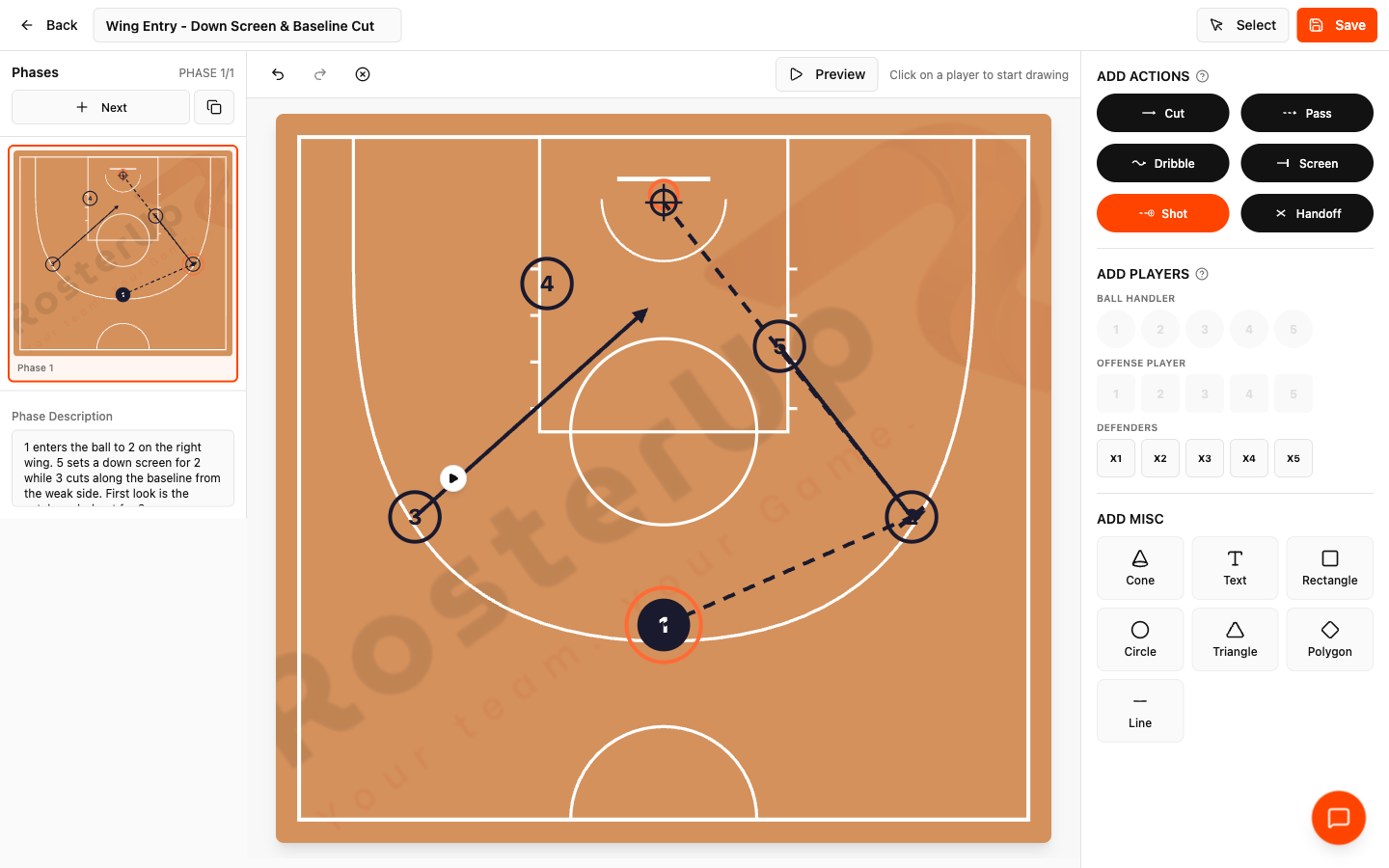
Six action types, drawn in the notation you already use.
How it works
From setup to match day, step by step.
01
Open Exercises from the team page. The library lists your team’s saved plays, each with a thumbnail of the first phase, the number of phases and the date it was created, plus View, Edit and a public link.
02
New Exercise opens the editor. The court fills the centre of the screen, drawn to scale for your team’s sport. The right panel holds three groups of tools:
03
– Add Players – Ball Handler 1 to 5, Offense Player 1 to 5, and Defenders X1 to X5. Pick one and click the court to place it. The ball handler is marked with a ring so it is always clear who starts with the ball. – Add Actions – Cut, Pass, Dribble, Screen, Shot and Handoff. Each has its own line style, the way a coaching manual would draw it: a dashed line with an arrow for a pass, a squiggle for a dribble, a bar for a screen. – Add Misc – Cone, Text, Rectangle, Circle, Triangle, Polygon and Line, for drills, zones and annotations.
04
To draw an action you click one player and release on another. The prompt on screen says exactly that. The resulting line is a curve with a control point, so a pass around a defender bends the way it would in reality rather than cutting straight through.
05
The left panel holds Phases. A play is usually more than one movement, so each phase is a separate board state with its own description. Next adds a phase, and a duplicate control copies the current one so you can build the second movement from the first. Undo, Redo and Clear All sit above the court.
06
Preview plays the current phase back as an animation. Name the exercise, press Save, and the play joins your team’s library with a public link.
What you get
Everything in Playbook.
Sport-specific courts
A basketball half-court, a football pitch and a volleyball court, each drawn properly rather than as a generic rectangle. Volleyball adds court zones Z1 to Z6 and opponent markers; football offers a match format so a 7v7 diagram is not drawn on an eleven-a-side pitch.
Coaching notation
Six action types with the line styles coaches already recognise – Cut, Pass, Dribble, Screen, Shot and Handoff.
Curved action lines
Every action is a curve with a draggable control point, so passes bend around defenders and cuts arc the way they actually run.
Ball tracking
RosterUp knows who starts with the ball and follows it through every pass, handoff, dribble and shot in the play.
Multi-phase plays
Build a play as a sequence of phases with a written description for each, and duplicate a phase to build the next movement from it.
Animated playback
Press Play and the actions run in the order they were drawn, with the ball travelling along each path. Pause, Reset to the starting positions, or skip to the next phase.
Annotation tools
Cones, text boxes and shapes for drills and zone markings.
Undo, redo and clear
Normal drawing controls.
Public sharing
Every saved exercise has a public link that opens the animated play for anyone, with no account.
Team library
Plays are stored against the team, so a playbook accumulates over a season rather than being redrawn every week.
A closer look
Screen by screen.
Captured from the live RosterUp app.
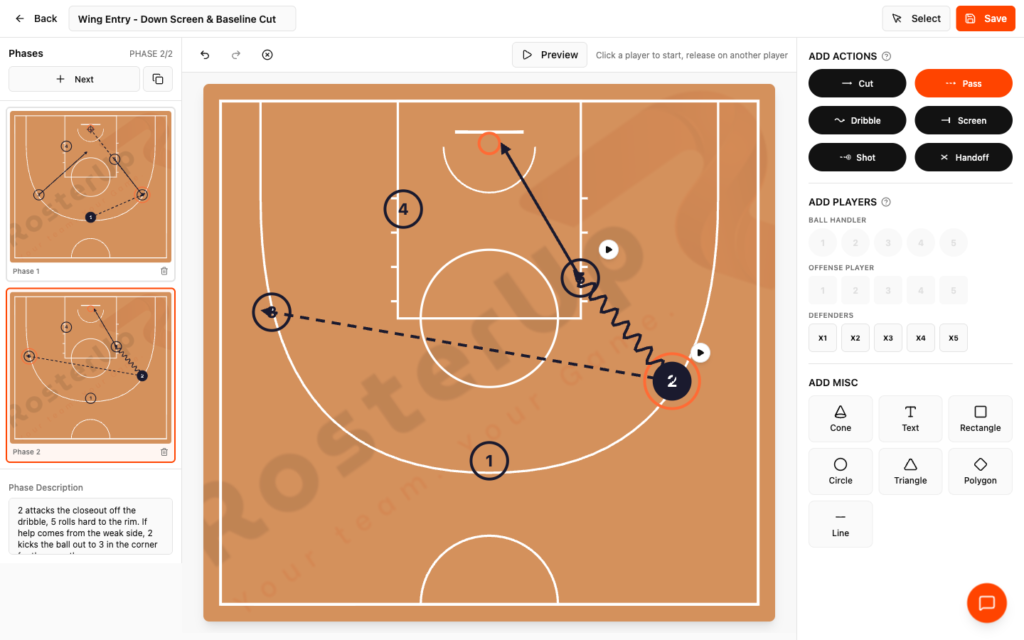
Entry, action, counter – one phase each, with your own notes.
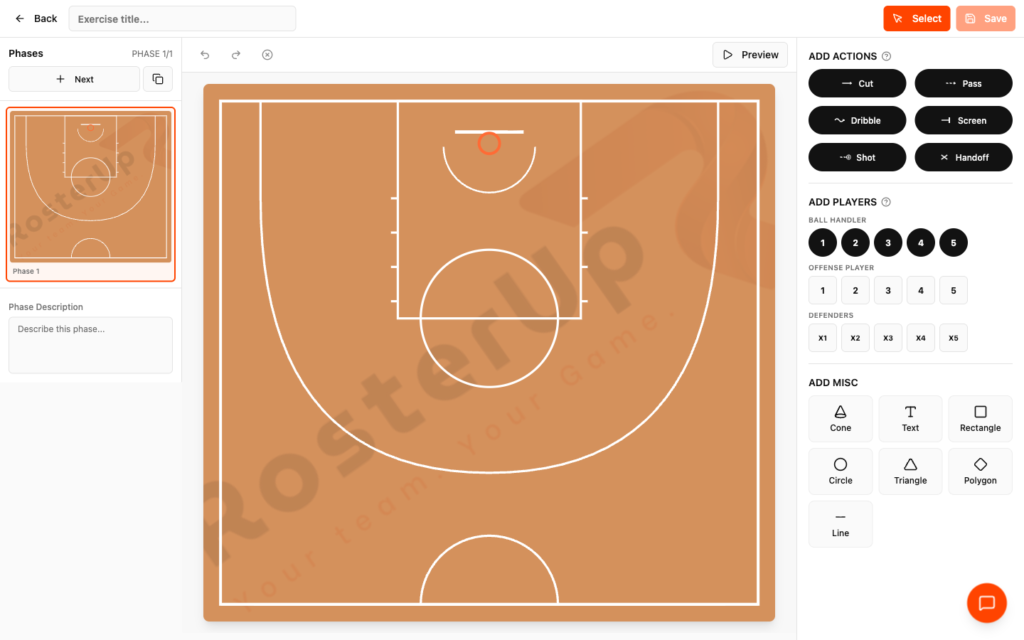
A real court, not a generic rectangle.
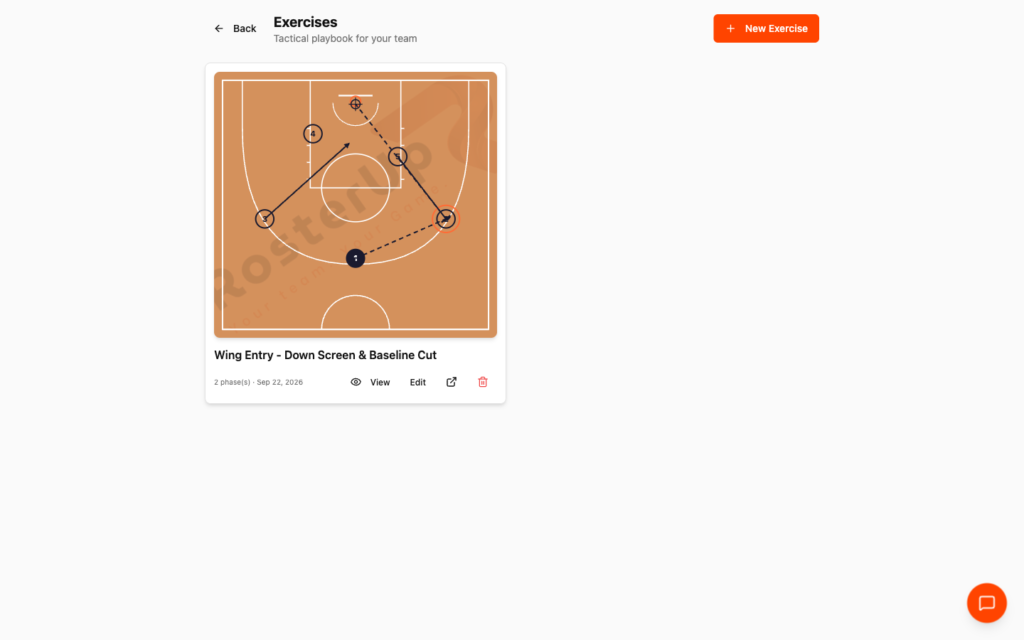
A playbook that accumulates instead of being redrawn every week.
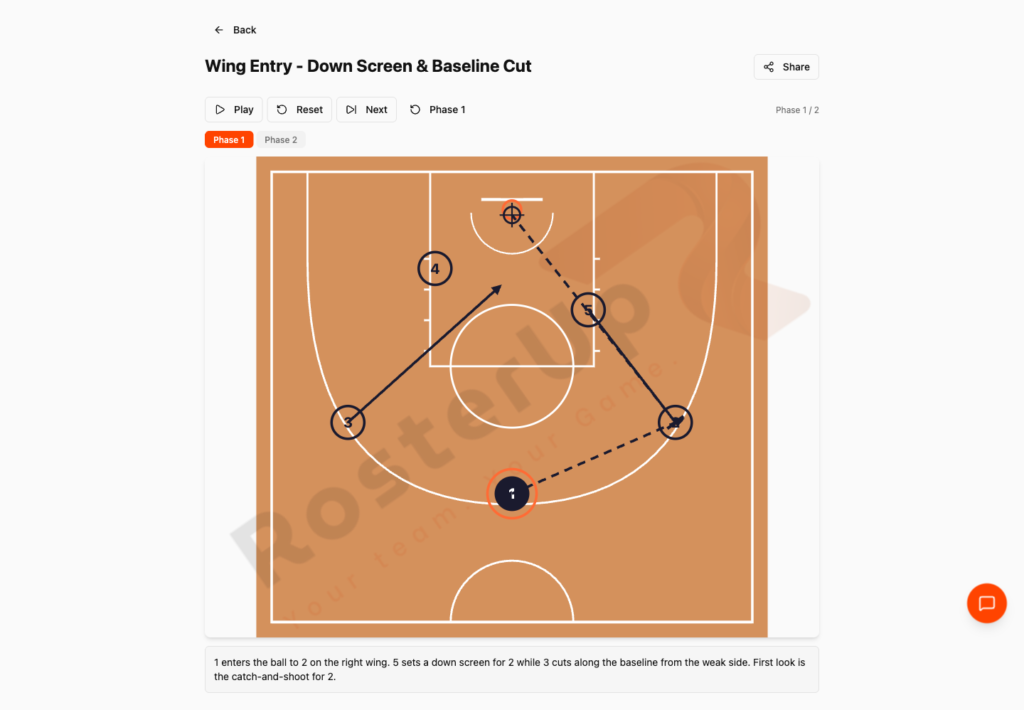
One link. Replay it as many times as it takes.
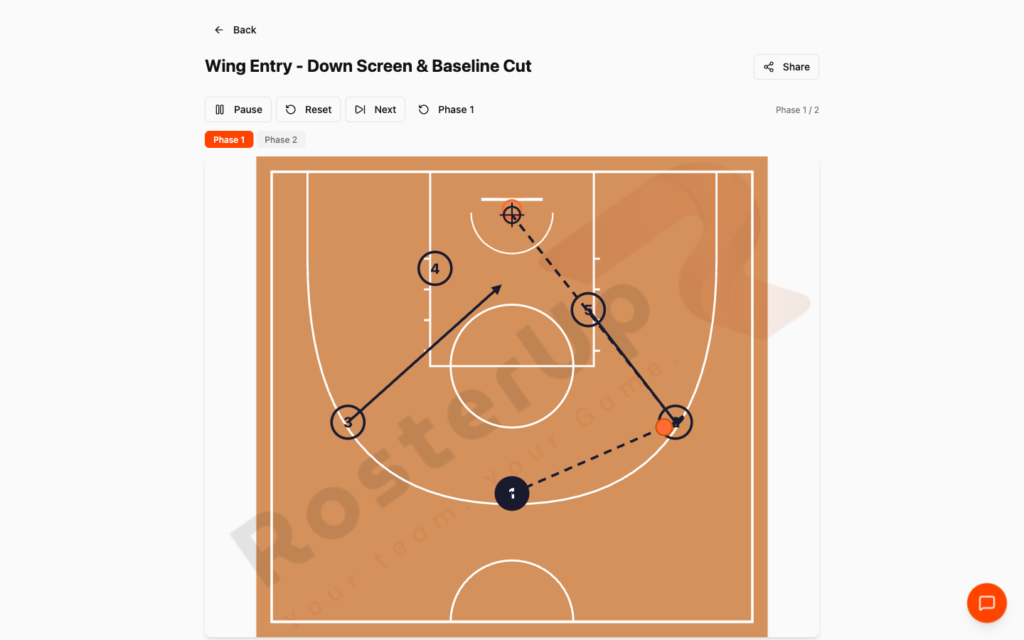
The ball follows the paths you drew.
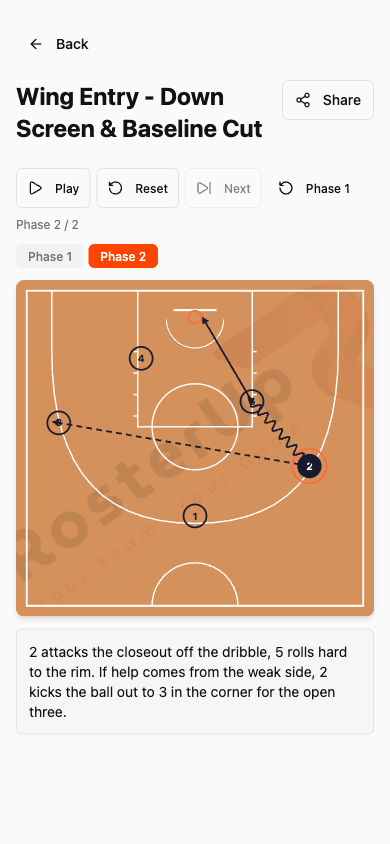
Learned on the bus, not in a noisy hall.
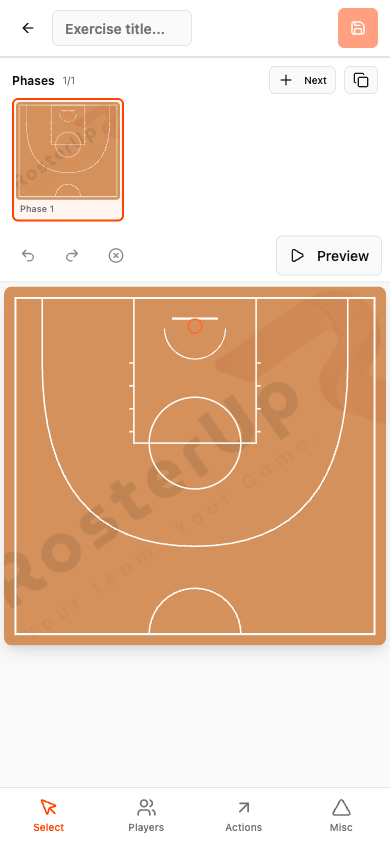
Draw it on the phone in your hand.
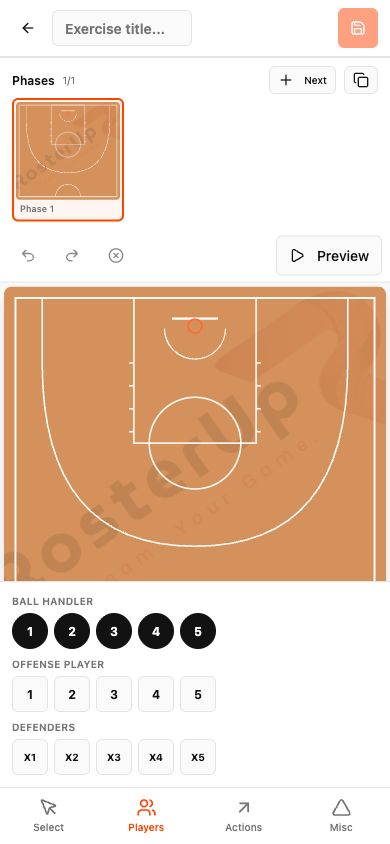
Tools come up from the bottom, the court stays visible. — ## Gaps to re-capture later – Football pitch and volleyball court boards. The audit only drew on the basketball court. The football match-format selector and the volleyball zone and opponent markers are documented from the product’s configuration but NOT captured. Needed before publishing the multi-sport section. – A drill diagram using cones, text and shapes. – Dragging a curve control point to bend a pass – worth a short video. – A short screen recording of the full two-phase animation. This is the single most valuable missing asset for this page.
Who it helps
Both sides of the team sheet.
For coaches and managers
You build the playbook once. The set play you spent twenty minutes explaining in September is a link in October, and a new player can watch it five times before their first session instead of learning it in traffic during a live drill.
Drawing is also faster than describing. Six action types with the right notation means you are working in the language you already think in, and the phase structure matches how plays actually work – entry, then action, then the counter.
For players
A play you can replay is a play you can learn. A player who did not follow the explanation in the hall opens the link on the bus and watches it as many times as they need, with the coach’s description of each phase written underneath. No guessing at smudged arrows.
Wherever you are
Built for the sideline, shared with a link.
On the phone
The editor has a dedicated mobile layout. Instead of a fixed right-hand panel, the bottom of the screen carries a four-item toolbar – Select, Players, Actions, Misc – and tapping any of them raises a bottom sheet with that tool group. The court stays large, the phase strip sits above it, and drawing is done with a finger.
Viewing is even more mobile-friendly: the shared play renders full width with the Play, Reset and Next controls in a row and the phase description underneath, which is how most players will actually meet the playbook.
Sharing and public access
Every saved exercise gets a public URL of the form
app.rosterup.eu/exercise/your-play-slug. Opening it needs no account. The public page carries the title, the phase tabs, the court, the full animation controls – Play, Reset, Next, phase selector – and the written description of the phase being shown. It is a read-only view: nobody can edit your play by opening the link. In practice
How real teams use it.
A basketball coach draws a wing entry with a down screen and a baseline cut, splits it into two phases, and shares the link so the squad can watch it before Thursday.
A volleyball coach diagrams a serve-receive rotation using the court zones and opponent markers.
A 7v7 youth football coach draws a build-up pattern on a pitch scaled to the actual format.
A coach builds a cone drill using the misc tools and text annotations, and shares it as the warm-up for the next three sessions.
A new signing watches the team’s five set plays on their phone before their first training session.
Why not just a group chat and a spreadsheet?
A whiteboard is erased at the end of the session and cannot leave the hall. A photo of a whiteboard is a static, badly lit rectangle that nobody opens twice. Drawing on a generic diagramming app means building a court from scratch and inventing your own notation, and it still will not animate.
The gain here is motion plus persistence: the play moves, so it explains itself, and it has a permanent link, so it keeps explaining itself all season.
Questions
Frequently asked.
Which sports can I draw for?
Basketball, football and volleyball, each on a properly drawn court or pitch. Volleyball adds court zones and opponent markers; football lets you set the match format so a 7v7 diagram is not drawn on a full-size pitch.
What action types are available?
Cut, Pass, Dribble, Screen, Shot and Handoff, each drawn in the notation coaches already use.
Do the plays actually animate?
Yes. Press Play and the actions run in the order you drew them, with the ball travelling along each path. You can pause, reset to the starting positions or skip to the next phase.
What is a phase?
A separate board state within the same play. Most plays have an entry, an action and a counter, so you build each as its own phase with its own written description. A duplicate control copies a phase so you can build the next one from it.
Can I bend a pass around a defender?
Yes. Action lines are curves with a control point you can drag.
Can players see the play without a RosterUp account?
Yes. Every saved exercise has a public link that opens the animated play read-only, with no sign-in.
Can I draw on my phone?
Yes. The mobile editor replaces the side panel with a bottom toolbar – Select, Players, Actions, Misc – and each opens a bottom sheet of tools.
Can I add cones and annotations for drills?
Yes. The Misc tools include cones, text boxes, rectangles, circles, triangles, polygons and lines.
Where are my plays stored?
Against your team, in a library that shows a thumbnail, the phase count and the date for each play.
Can somebody edit my play by opening the shared link?
No. The public view is read-only.
Next
Works with the rest of RosterUp.
Game Plan
Build the whole game on one screen and get every player’s minutes calculated for you.
Read more
Public Sharing
Plans, plays, splits and live scores all open from a link, read-only, with no account.
Read more
Team Management
One team profile that holds your players, your staff and exactly who is allowed to do what.
Read more
Get started
Draw the Play. Press Play.
Free to start. No sales call. Create your team and bring the squad in today.