Feed
Where Local Sport Gets Seen
A feed that is only sport, filtered to your sport and your country. Post results, photos and updates to the people who actually care.
Free to start · No sales call · Basketball · Football · Volleyball
What it is
Feed
The Feed is RosterUp’s public side: a sports social feed where players, coaches and teams post updates, photos and results. Posts carry a sport tag and hashtags, and the feed can be filtered by country and by sport, so a basketball player in Bulgaria sees basketball in Bulgaria. You can post as yourself or comment as one of your teams.
Team tools keep a squad organised, but they do not help a team be seen. Clubs still need somewhere to announce a signing, post a result, celebrate a player or look outward at what other teams in their city are doing. Most end up on a general-purpose social network where the audience is friends and family rather than the local sports community, and where a post about a Tuesday scrimmage competes with everything else in the world.
The RosterUp Feed is narrower on purpose. Everything in it is sport. Every post carries a sport and a location context, so the filters actually work. A volleyball coach in Sofia can set the feed to Volleyball and Bulgaria and read something relevant.
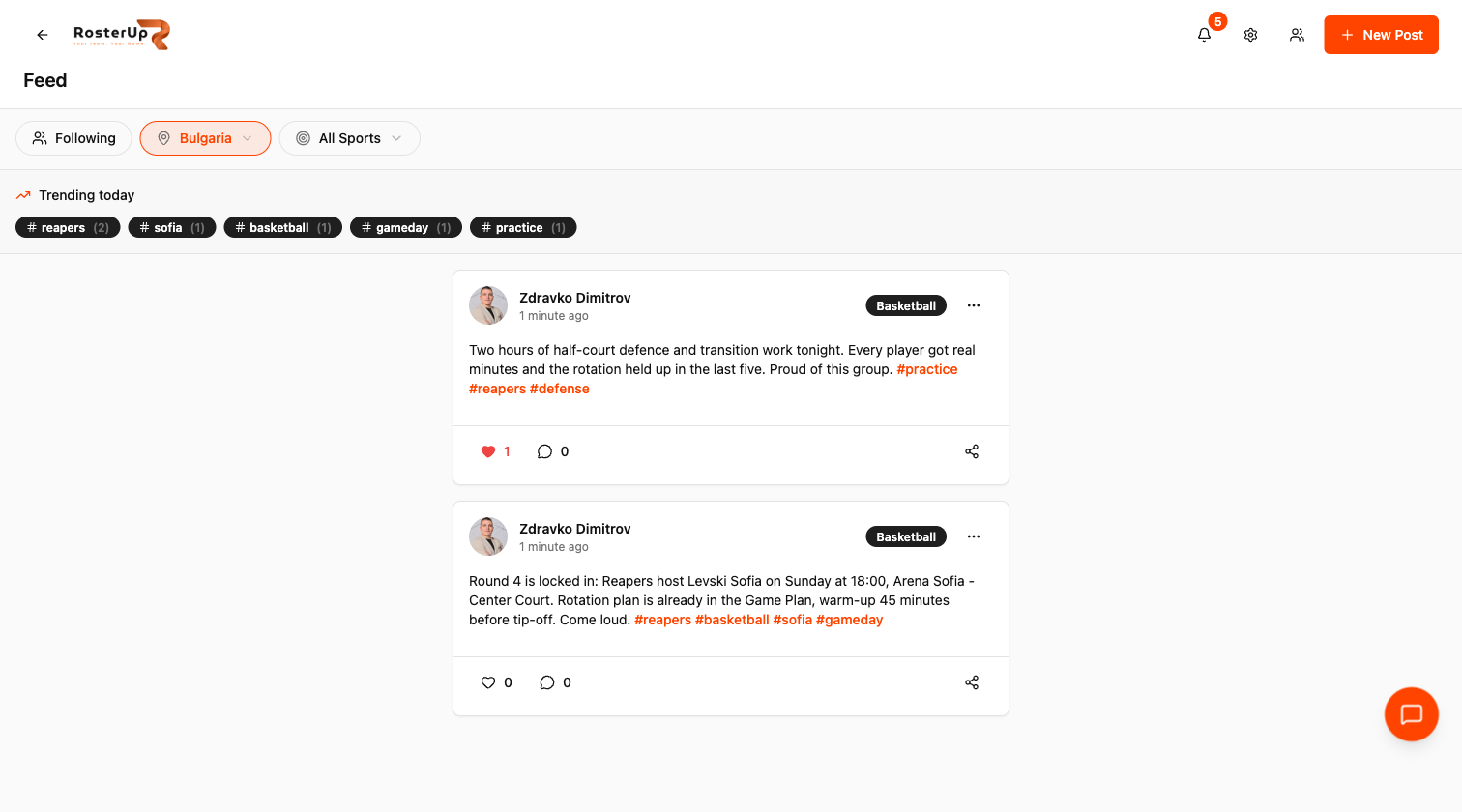
A feed that is only sport, filtered to your sport and your country.
How it works
From setup to match day, step by step.
01
Open Feed from the dashboard or the bottom navigation. Three controls sit above the stream:
02
– Following toggles between everything and only the people and teams you follow. – A country selector, defaulting to your own country, with an All Countries option. – A sport selector, defaulting to All Sports.
03
Below them sits Trending today – hashtag chips with post counts, tapped to filter the stream to that hashtag.
04
New Post opens a composer showing who you are posting as, a Public visibility marker, a text area, a sport selector, and the reminder “Use #hashtags to make your post discoverable”. Hashtags typed into the body become live filter links once the post is published.
05
Each post card shows the author’s avatar and name, a relative timestamp, a sport badge, the body text with hashtags in brand colour, a like control, a comment control and a share control. An overflow menu holds edit, delete and report.
06
Comments open in a sheet, and this is where RosterUp does something most feeds do not: a Comment as selector lets you post the comment as yourself or as one of your teams. A club can reply in its own name rather than through whichever admin happened to be logged in.
What you get
Everything in Feed.
Sport-scoped feed
Every post is tagged with a sport, and the whole feed can be filtered to one sport.
Country filter
Defaults to your country, with a full country list and an All Countries option. Local sport is local, and the feed respects that.
Following mode
Switch from the open feed to only the friends and teams you follow. The empty state tells you exactly what to do: “Follow some teams or add friends to see their posts here.”
Hashtags and Trending today
Hashtags in a post become tappable filters. The Trending today strip shows the most used tags with their counts, which is how a local scene becomes discoverable.
Comment as a team
Reply as yourself or in your team’s name and avatar.
Likes, comments and replies
Standard reaction and threading on every post, with reactions available on comments too.
Media posts
Posts support images with a gallery, a lightbox for full-size viewing, and an in-app image editor and cropper before posting.
Sharing and reporting
Every post has a share control, and a report option for content moderation.
Profile integration
Posts appear on the author’s profile alongside their teams, so a player’s profile becomes a record of their season.
A closer look
Screen by screen.
Captured from the live RosterUp app.
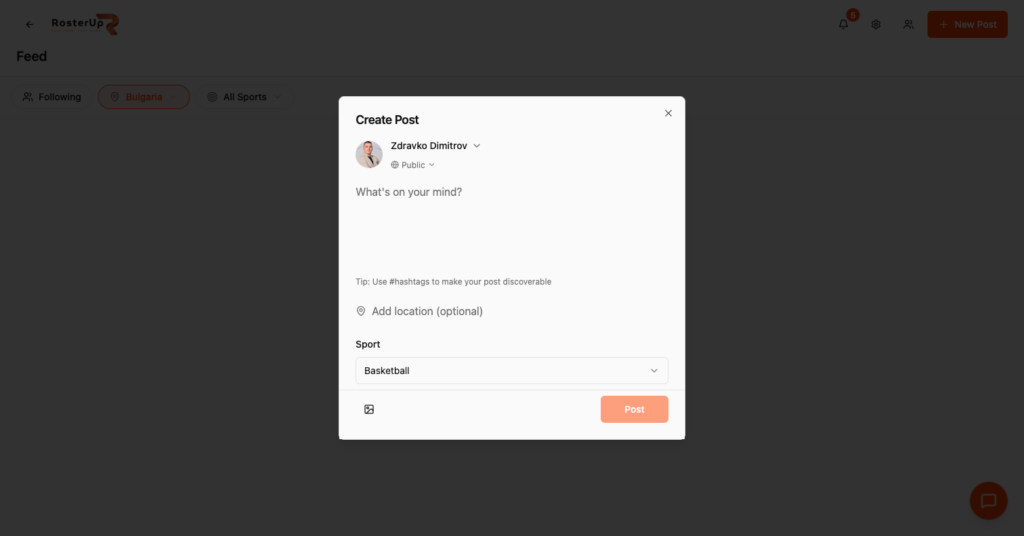
Write it, tag the sport, publish.
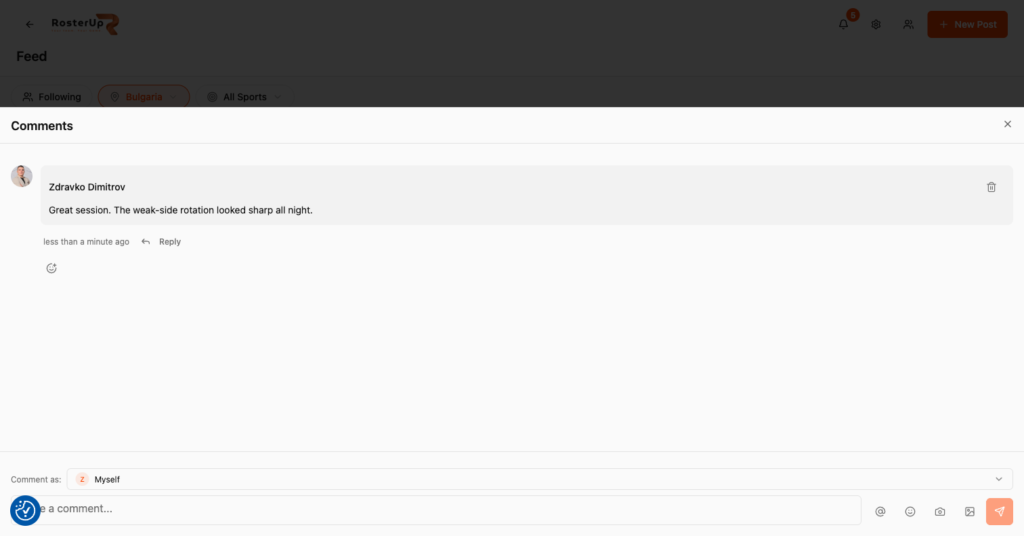
Reply in your club’s name, not in whoever happens to be logged in.
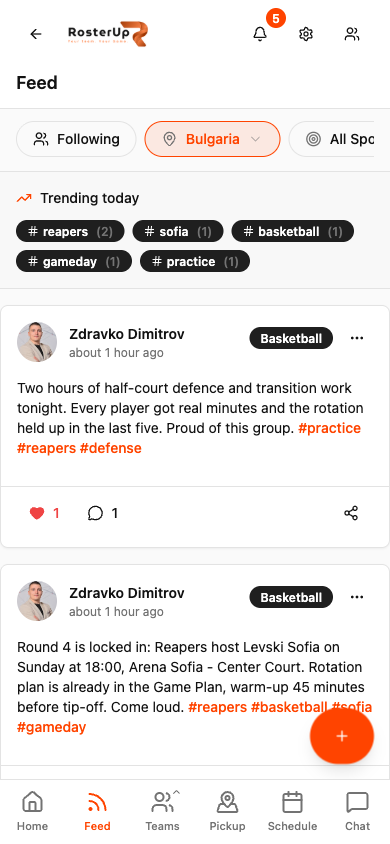
Built for the phone in the changing room. — ## Gaps to re-capture later – A post containing photos, showing the image gallery and lightbox. The audit created text-only posts. NEEDS VERIFICATION of the image editor and cropper. – The hashtag filter applied (feed narrowed to one tag). – The Share post dialog. – A feed with posts from multiple authors and teams, which would read far better than two posts from the same account.
Who it helps
Both sides of the team sheet.
For coaches and managers
The Feed is where your club exists in public. A result posted with #yourclub and your city becomes discoverable by players looking for a team. Announcements stay internal; the Feed is the outward-facing half. For clubs recruiting from a local pool, that visibility is the point.
Commenting as the team rather than as a person also matters for clubs with several staff – the club voice stays consistent even when the person typing changes.
Wherever you are
Built for the sideline, shared with a link.
On the phone
The Feed is a full-width mobile stream with the filter row pinned above it, the trending hashtag chips scrolling horizontally underneath, and a Feed tab in the persistent bottom navigation. Comments open as a bottom sheet rather than a new page, so you never lose your place in the stream. The image composer supports picking, reordering and cropping photos on the phone.
Sharing and public access
Posts are created as Public. They are visible to other signed-in RosterUp users through the feed, the author’s profile, the country and sport filters, and the hashtag filters. Each post also has a share control for passing a post on.
In practice
How real teams use it.
A basketball club posts its Sunday result with #reapers #basketball #sofia and picks up followers from the local scene.
A coach posts a practice recap so players who missed the session know what was covered.
A volleyball academy posts photos from a tournament weekend, using the image gallery.
A player who has just moved city sets the feed to their sport and their new country to find out who is playing there.
A club replies to a supporter’s comment as the club rather than as the club secretary.
Why not just a group chat and a spreadsheet?
A general social network will show your match report to your aunt and not to the point guard two neighbourhoods away who is looking for a team. There is no sport filter, no country filter that means anything for amateur sport, and no concept of a team as an account you can comment from.
The Feed is also connected to the rest of RosterUp: the team you post about is a real team with a roster, a schedule and a join button. A reader who likes what they see is one tap from requesting to join.
Questions
Frequently asked.
What is the difference between the Feed and Announcements?
Announcements are private to your team and used for instructions. The Feed is public and used for updates, results and photos that you want the wider sports community to see.
Can I filter the feed to my own sport?
Yes. The feed has a sport selector and a country selector, and both can be set to show everything instead.
What does the Following toggle do?
It narrows the feed to only the friends you have added and the teams you follow.
Do hashtags actually do anything?
Yes. Hashtags in a post become tappable filters, and the Trending today strip shows the most used tags with post counts.
Can I post as my team instead of as myself?
Comments can be posted as yourself or as any team you belong to, using the Comment as selector.
Can I post photos?
Yes. Posts support images with a gallery view, a full-size lightbox, and an image editor and cropper before posting.
Are posts public?
Posts are created as Public and are visible to other RosterUp users through the feed, your profile and the filters.
Can I edit or delete a post?
Yes, from the overflow menu on your own post. Posts can also be reported for moderation.
Do posts appear on my profile?
Yes. Your profile shows your posts alongside your teams and friend count.
Can somebody follow my team without joining it?
Yes. Public teams can be followed from the team directory, and their posts then appear in the follower’s Following feed.
Next
Works with the rest of RosterUp.
Player Profiles
One sports profile for every team you play for, with the record of how often you turn up.
Read more
Announcements
Pinned, prioritised messages that sit at the top of your team page until they stop mattering.
Read more
Pickup Games
Post a game with a venue, a time and a number of spots, then let the spots fill themselves.
Read more
Get started
Where Local Sport Gets Seen
Free to start. No sales call. Create your team and bring the squad in today.