Pickup Games
Post the Game. Let the Spots Fill Themselves.
A pickup game with a fixed capacity, a live count and a waitlist – plus a link that anyone can open and join, account or not.
Free to start · No sales call · Basketball · Football · Volleyball
What it is
Pickup Games
Pickup Games is RosterUp for everyone who does not have a team. Post a game with a venue, a time, a format and a number of spots; players find it in Discover, filtered by country, city, sport and day; and anyone with the link can join – including guests without an account. Capacity, waitlist and a discussion thread are handled for you.
Organising a recreational game is a job nobody wants. You need ten people for a 5v5 and you have four confirmed, three maybes and one who replied to the wrong message. You count heads in a chat thread all week. Somebody turns up who never confirmed and somebody who did confirm does not. When you finally have ten, you have no idea who paid.
Pickup Games replaces the counting. A game is a real object with a fixed capacity, a live count and a roster you can read. When it fills, extra sign-ups go to a waitlist instead of quietly over-booking the court. And because the game page is public, sharing it once in any group chat is enough – people join from the page rather than replying to you.
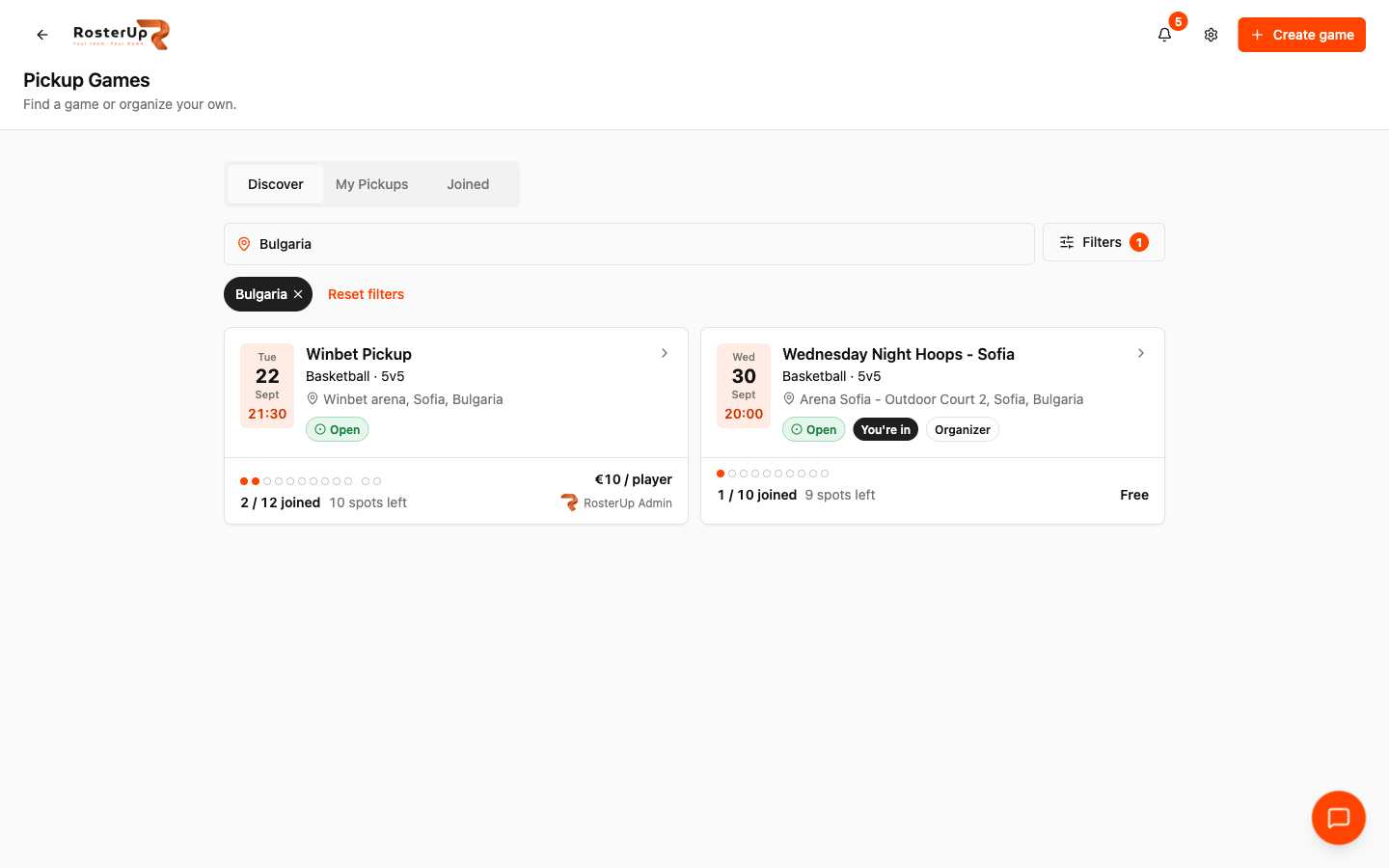
Find a game by sport, city and day.
How it works
From setup to match day, step by step.
01
Open Pickup Games from the dashboard or the Pickup tab in the bottom navigation. Three tabs sit at the top: Discover, My Pickups and Joined.
02
Discover shows upcoming games in your country. Each card carries the day, date and start time in a block on the left, then the title, the sport and format, the venue with city and country, a status badge, a capacity indicator showing how many of the spots are taken and how many are left, and the price. Games you have already joined are marked “You’re in”, and games you organise are marked “Organizer”.
03
The Filters sheet narrows the list by country, city, sport, day, status and how many spots are still free. The sport list is wider than the rest of RosterUp – Basketball, Football, Volleyball, Futsal, Tennis, Padel, Handball and Other – because recreational sport is wider than club sport. The spots filter asks the right question for a group: “Coming with friends? Ask for enough room for everyone.”
04
Create game walks through five short sections. The game: a title, a sport, a format from 1v1 to 5v5 or Custom, and a player capacity, with a live explanation of what the number means – “10 play at once, no substitutes. Extra sign-ups go to a waitlist.” When: date, start time in the venue’s local time, and an optional duration. Where: country and city, which is how players find you, plus the venue name, an optional address and an optional map link. Price: Free or a price per player, with the honest note “For information only. RosterUp does not collect payments.” Notes for players: a description prompting for level, what to bring, how to pay and where to meet. Two switches finish it: I’m playing, which takes the first spot on the roster for you, and Show in Discover, which when switched off makes the game reachable only by link.
05
The published game gets its own public page with a proper page title for sharing and search. It shows the status, the full date and venue, the price, the live capacity, the organiser’s notes, the player list, and a Discussion thread for questions. Players get Add to Calendar, Copy link, Share Pickup Game and Leave game.
06
Organisers get a Manage game panel that only they can see, with Edit, Close registration, Cancel game and Delete. The panel states plainly that the phone numbers in the player lists are visible to the organiser alone, so they can reach a player about that specific game.
What you get
Everything in Pickup Games.
Eight sports
Basketball, Football, Volleyball, Futsal, Tennis, Padel, Handball and Other.
Formats and capacity
1v1 through 5v5 or a custom format, with a total player capacity and an explanation of what that means for substitutes.
Automatic waitlist
Sign-ups past capacity go to a waitlist rather than over-filling the game.
Discover with real filters
Country, city, sport, day (including Today and Tomorrow), status, and minimum free spots.
Public game pages
Each game has its own shareable page that works without an account.
Guest participation
People without a RosterUp account can join a game from the link.
Organiser contact details
Participants’ phone numbers are visible to the organiser only, for that game.
Discussion thread
Questions about the game stay on the game page instead of in a chat group.
Add to Calendar
One tap puts the game in a player’s own calendar.
Unlisted games
Turn off Show in Discover and the game is reachable only by link – the right setting for a private regular run.
Organiser controls
Edit, close registration, cancel or delete, and remove players from the list.
Price transparency
Free or a per-player price, displayed on the card and the page. RosterUp does not take payments and says so.
Split the teams
A pickup game’s confirmed players can be sent straight into Squad Splitter.
Dashboard reminder
Your next game appears on the RosterUp home screen with its time, venue and current sign-up count.
A closer look
Screen by screen.
Captured from the live RosterUp app.
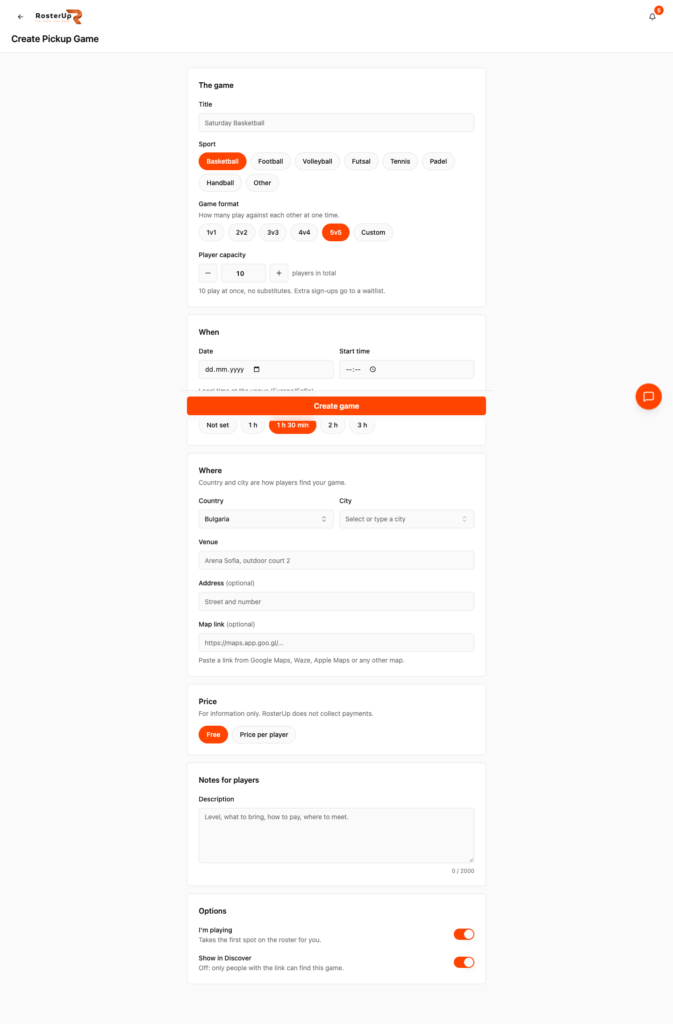
Every field tells you what it is for.
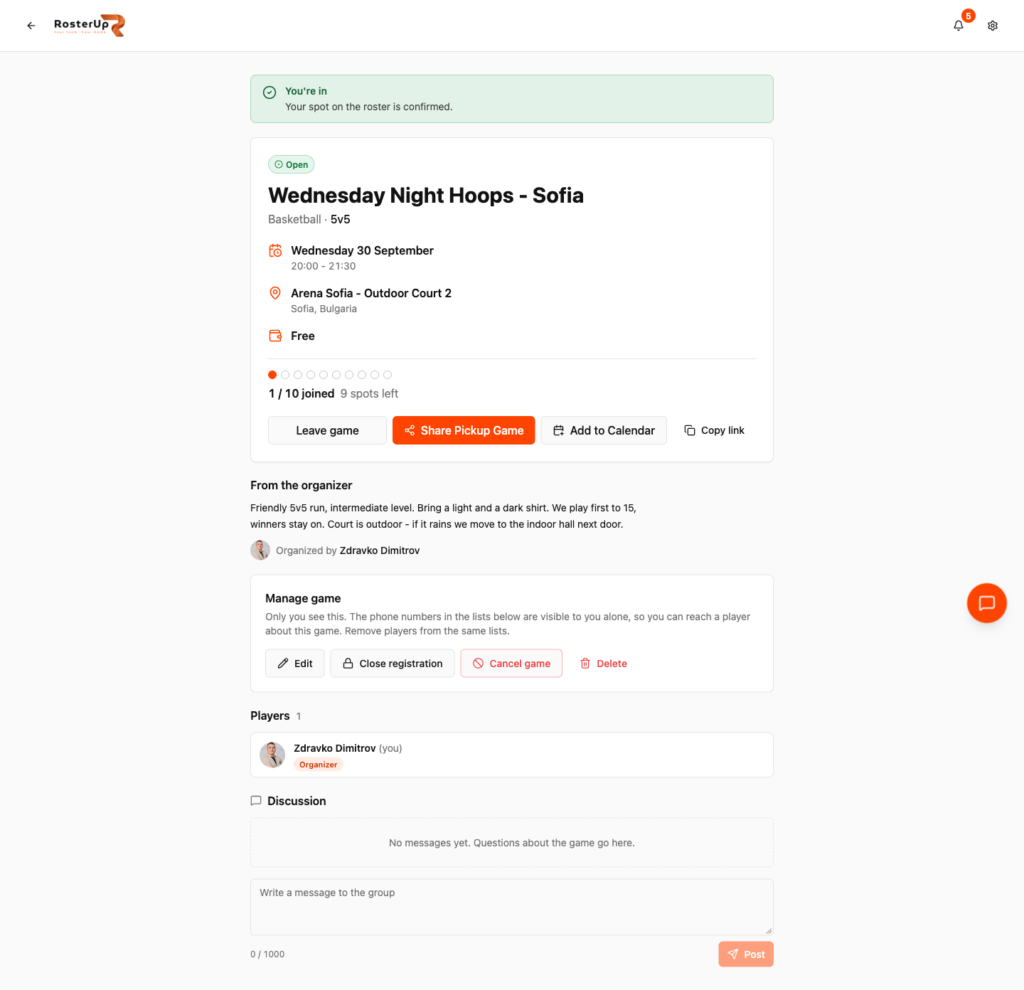
Capacity, roster, discussion and organiser controls on one page.
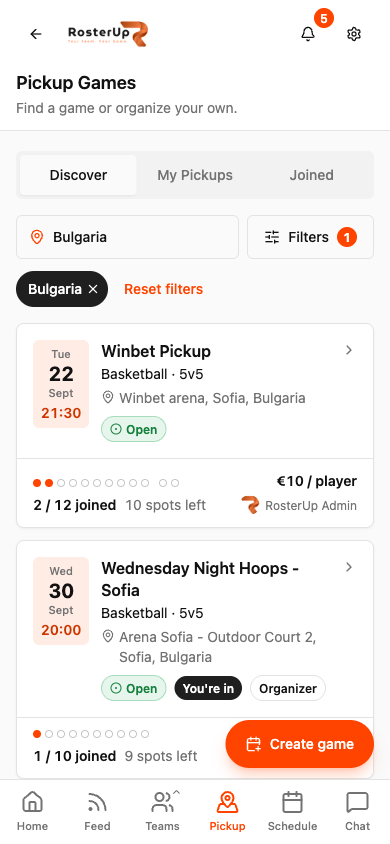
Built for the phone, because that is where games get organised.
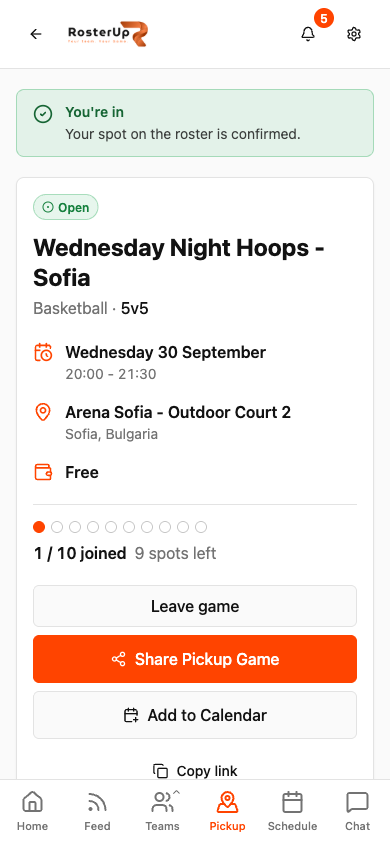
Share the link once. Everyone joins from the page.
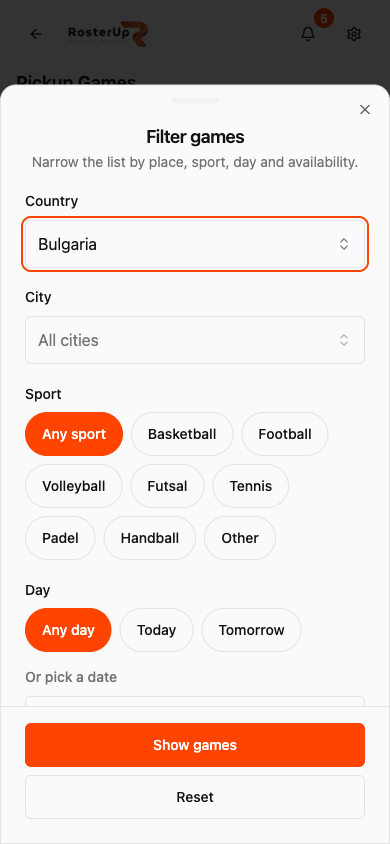
Eight sports, any day, any city – in a sheet built for thumbs. — ## Gaps to re-capture later – The guest join dialog, used by somebody without an account. This is a headline capability and it is NOT captured. NEEDS VERIFICATION of the exact flow. – A game at or over capacity, showing the waitlist state. – The signed-out view of a public game page. The audit viewed it while signed in. – The discussion thread with more than one participant. – Splitting a pickup game’s players in Squad Splitter (/pickup/{slug}/split). – My Pickups and Joined tabs with content.
Wherever you are
Built for the sideline, shared with a link.
On the phone
Pickup is the most phone-native part of RosterUp. Game cards stack full width with a large date block and a capacity dot strip you can read at a glance. Filters open as a bottom sheet with large chips for sport, day and spots rather than dropdowns. A floating Create game button sits above the content, and the Pickup tab is always one tap away in the bottom navigation. The public game page is equally phone-first – it is opened from a shared link on a phone almost every time.
Sharing and public access
Every game has a public URL of the form
app.rosterup.eu/pickup/your-game-slug, with a page title built from the game name so it reads correctly when shared in a chat app or found in search. The page works signed out. Players with an account join directly; people without one can join as guests. Organisers can keep a game out of Discover entirely and rely on the link alone. In practice
How real teams use it.
A regular Wednesday basketball run posts one game a week and shares the link in the group. The count looks after itself.
A padel group of eight uses a 2v2 format with a capacity of eight and an unlisted game.
A newcomer to a city filters Discover by sport and city and joins a game the same week.
An organiser closes registration once the court is paid for, then splits the confirmed players into two teams with Squad Splitter.
A company five-a-side uses the price field to show the per-player court fee without RosterUp handling any money.
Why not just a group chat and a spreadsheet?
A chat group cannot count. It has no capacity, no waitlist, no way for somebody outside the group to join, and no memory – next week you start the same thread again. A poll gets you a number but not a roster, and it cannot be shared beyond the group. A spreadsheet is worse on a phone.
The advantage is that a pickup game here is a page rather than a conversation: it has a fixed number of spots, a live count, its own discussion, and a link that works for anybody.
Questions
Frequently asked.
Which sports can I post?
Basketball, Football, Volleyball, Futsal, Tennis, Padel, Handball and Other.
Do players need a RosterUp account to join?
No. The game page is public and people without an account can join as guests.
What happens when the game is full?
Extra sign-ups go to a waitlist rather than over-filling the game. If somebody leaves, the spot frees up.
Can I keep a game private?
Yes. Turn off Show in Discover and the game is reachable only by its link.
Does RosterUp take payments?
No. You can display a price per player for information, but RosterUp does not collect any money.
Can I see participants' phone numbers?
As the organiser, yes, for your own game, so you can reach a player about it. The panel states clearly that nobody else can see them.
How do players find my game?
Through Discover, filtered by country, city, sport, day, status and how many spots are free – or through the link you share.
Can I ask for enough spots for my friends?
Yes. Discover has a minimum free spots filter with 1+, 2+, 3+ and 5+ options.
Can players ask questions about the game?
Yes. Each game page has a discussion thread, which keeps the questions off your direct messages.
Can I stop sign-ups without cancelling?
Yes. Close registration keeps the game but stops new players joining. You can also edit, cancel or delete it.
Can I split the players into teams?
Yes. A pickup game’s confirmed players can be sent straight into Squad Splitter.
Does the game go into my calendar?
Yes. Each game page has an Add to Calendar button.
Next
Works with the rest of RosterUp.
Public Sharing
Plans, plays, splits and live scores all open from a link, read-only, with no account.
Read more
Feed
A social feed that is only sport, filtered to your sport and your country.
Read more
Player Profiles
One sports profile for every team you play for, with the record of how often you turn up.
Read more
Get started
Post the Game. Let the Spots Fill Themselves.
Free to start. No sales call. Create your team and bring the squad in today.